
Pillar guide
Content architecture for topical authority
Last reviewed: 20 October 2026.
About this guide
I am Daud Lawrence, a Semantic SEO Specialist at Digital Versify, a UK agency in Gravesend. My qualifications are an MBA from the University of Sunderland (2011), an Edexcel Level 7 BTEC (2010), a BA (Hons) in Business Management from Sunderland (2008) and Google Squared Online (2016). More about my background is on my About page.
This is the second pillar guide on this site. It is the parent page for everything I write about entities, site architecture, internal linking and structured data. The first pillar guide, the Semantic SEO guide, covers the method: how to research a subject, plan a topical map and measure the result. This guide covers the build. It takes a plan like that one and shows how it becomes a set of URLs, links, page labels and machine-readable data.
I do not repeat the first guide. Where it already explains something, such as the history of Google’s language updates, search intent, AI search or measurement, I give a sentence or two and link back.
Every claim here carries a numbered reference, so you can check it. I also tag the strength of the evidence, because SEO writing often blurs three very different things:
- Confirmed by Google: Google has said it in its own documentation, blog posts or announcements.
- Inferred: a patent, paper or observed behaviour that suggests something, but does not prove how Google works today.
- Practitioner view: what people in the industry believe or have seen in their own work, including me.
Where I have no source, I say so. I also say when I tried to read a source and could not.
The two fictional businesses
I use the same two invented businesses as the first guide, so the guides connect. Brightwell Office Care Ltd is an imaginary commercial cleaning company in London. Prairie Line Janitorial LLC is an imaginary commercial cleaning company in Chicago. They do not exist, and I have not matched the names to any company register. Any web address I give for them uses the reserved “.example” ending, which cannot belong to a real site. Their purpose is to show a method, not to describe a real company.
Key findings from my study of real sites
In the section on my original study I describe how I looked at the structure of commercial cleaning sites that rank in London and Chicago. These are the main results, so you do not have to wait for them. The sample is small (10 London sites and 9 Chicago sites), taken on one day, so treat it as a description and not as proof of what ranks [1].
- Services get their own pages. All 10 London sites and 7 of 9 Chicago sites link separate pages for individual services. Two small Chicago sites list their services as headings on one page.
- Area pages are common. 6 of 10 London sites and 6 of 9 Chicago sites link individual area pages. The longest lists had 18 to 41 links. This is the pattern Google’s doorway policy asks site owners to take care with [2]. I did not review the content of those pages, so I make no claim about any site.
- Pricing pages are rare. Only 2 of 10 London sites and 2 of 9 Chicago sites linked a pricing page from the page I read, although cost questions appear in the “People also ask” boxes in both cities [3].
- Breadcrumbs are rare. One London site and two Chicago sites showed a clear breadcrumb trail.
- URL shape differs. Six of 10 London sites put service pages straight under the domain. Two Chicago franchise sites used service paths of four to six segments.
- Mixed audiences. Four of 10 London sites and 3 of 9 Chicago sites sell home cleaning from the same navigation as commercial cleaning.
None of this tells you what causes a site to rank. It tells you what the visible competition looks like, which is the right place to start a plan.
How I prepared this guide
I read ten widely used guides on site architecture, internal linking, entity SEO and schema markup, to see which topics they cover, and checked their rules of thumb against Google’s own documents [4][5][6][7][8][9][10][11][12][13]. I read the guides as text summaries, so I do not quote any of them as evidence. Where a rule of thumb is widely repeated, I label it a practitioner view. I read the Google documents named in the reference list in full on 20 October 2026. The page dates in the references are the dates Google showed.
Contents
- About this guide
- What content architecture is, and why it matters
- Entities in depth
- Choosing the central entity of a site and of each page
- Architecture models and when to use them
- URL rules
- Restructuring an existing site
- Crawl and technical structure
- Internal linking in depth
- Navigation links, contextual links and how link value flows
- Cannibalisation, doorway pages and location pages
- UK and US versions of a site
- Stage 2 in full: from topical map to site architecture
- Structured data in depth
- Entity home, Knowledge Panels and consistency off the site
- Architecture and structured data for AI search
- My study: how top-ranking cleaning sites in London and Chicago are built
- Auditing an existing site’s architecture
- Myths and mistakes
- Checklist
- Frequently asked questions
- Summary
- Glossary
- References
What content architecture is, and why it matters
Content architecture is how a site’s pages are grouped, named, addressed and linked, and how those pages are labelled for machines. It has four layers:
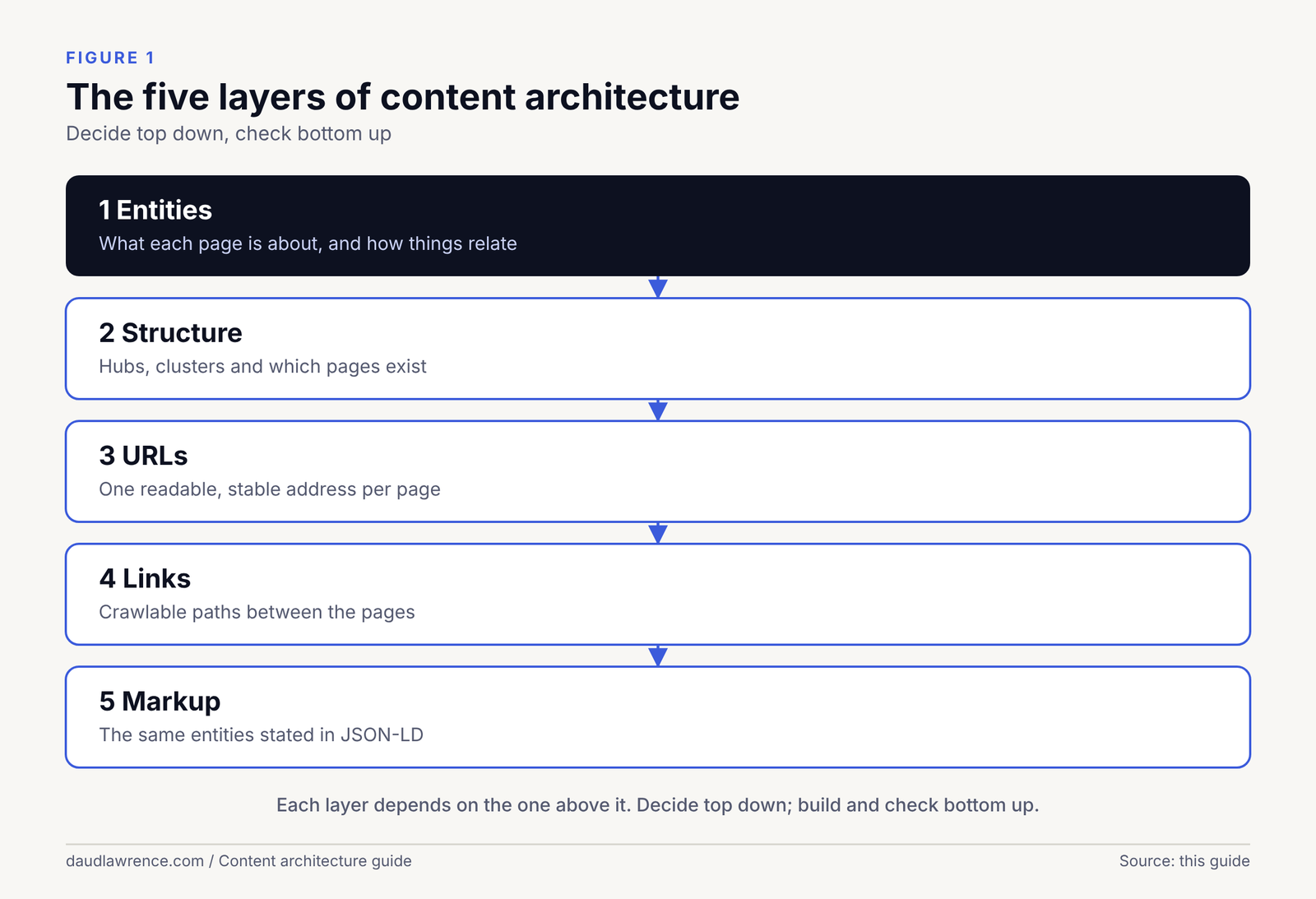
- Topics: which subjects the site covers and which page answers which question.
- Structure: the hierarchy of hubs and supporting pages, and the URLs that show it.
- Links: navigation, breadcrumbs and links inside the text that connect pages.
- Labels: structured data and on-page statements that say what each page and the business are.
The first guide plans the first layer. This guide covers the other three.
What it does for people
A visitor who lands on a page needs to know where they are and where to go next. Google’s own starter guide says to organise a site “in a logical way because it can help search engines and users understand” how pages relate [14]. For a service business, that means a buyer can move from “what do you do?” to “what does it cost?” to “do you cover my area?” without hunting.
What it does for crawlers
Crawlers find pages by following links. Google says “the vast majority of the new pages Google finds every day are through links” [14], and that it can generally crawl a link only if it is an <a> HTML element [15]. It also asks that “every page you care about should have a link from at least one other page on your site” [15]. These are Confirmed by Google.
What it does for AI systems
Google says no special markup is needed for its AI features [16]. Beyond that, nobody outside Google can say how architecture affects AI answers. My own view is an Inference: a site where each page answers one clear question, and where pages that belong together are linked, gives a retrieval system fewer ambiguous pages to choose from. That lowers the cost of finding the right passage. I cannot prove it, and the first guide explains the limits of what is known about AI search.
What it does not do
Architecture is not a ranking factor on its own. Google’s starter guide says search engines “will likely understand your pages as they are right now, regardless of how your site is organized,” and tells readers not to “drop everything and start reorganizing your site right now” [14]. A restructure needs a reason. Good reasons are real duplication, pages that nobody can reach, URLs that confuse people, or a business that has changed.
| Audience | What is confirmed | What is inferred or practitioner view |
|---|---|---|
| People | Logical organisation helps users [14] | Fewer steps to the key pages improves conversion (practitioner view) |
| Crawlers | Links are the main discovery route; <a href> links are crawlable [15][14] | Click depth affects crawl priority (practitioner view; no Google number found) |
| AI systems | No special markup needed [16] | Clear one-question pages and consistent entities lower retrieval cost (inference) |
Entities in depth
The first guide explains the basics: an entity is a distinct thing that can be identified, with attributes (facts about it) and relationships (links to other entities), and Google’s Knowledge Graph is its public store of such things. It also explains reconciliation, where different names are matched to one entity. See the Semantic SEO guide for that. This section covers what it leaves out: how a business describes itself so that a machine can tell what it is.
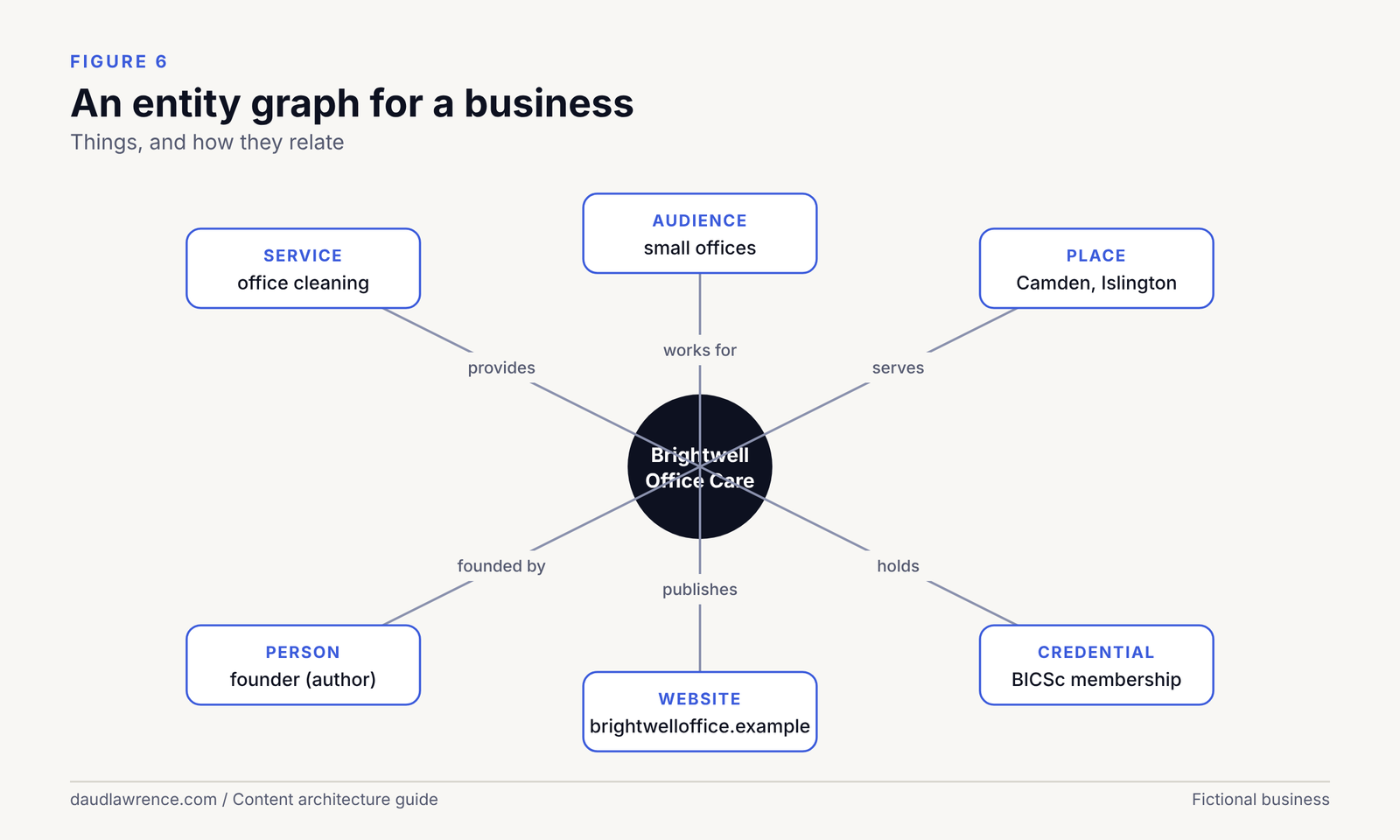
Entity types and the schema.org family
Structured data uses a shared vocabulary called schema.org, which describes itself as “a collection of shared vocabularies webmasters can use to mark up their pages” [17]. Its types form a family tree. For a service business, the types that matter are Organization, LocalBusiness (a subtype of Organization, as Google’s local business documentation notes [18]), Person, WebSite and WebPage. A type tells a machine what kind of thing the page is about. It is the entity’s type, in the first guide’s terms.
Use the most specific type that is true. Google tells local businesses to use the most specific subtype available and to provide an array of types when there is more than one [18]. For Brightwell, a cleaning firm, I would start with LocalBusiness and check whether schema.org has a more specific subtype that fits [18].
Three layers of identity
For a business to be recognised as one entity, I find it useful to think in three layers. This is my framework, a Practitioner view, not a Google scheme.
- On the site: the name, type, address or service area, and the people and credentials, stated in plain text on a page that is easy to find. Practitioners call this page the entity home.
- In structured data: the same facts in JSON-LD, with a stable identifier and links to other places that describe the entity.
- Off the site: registers, directories and profiles that carry the same name and facts, so that the site is one of several agreeing sources.
Google confirms parts of this. Its documents say a knowledge panel “generates automatically based on public information on the web” and that its descriptions “come from various data sources and can’t be edited” [19]. So the layers are inputs you control, and the result is not.
Names: one entity, several labels
A business has more than one name, and each should be used for a reason. Google’s Organization documentation lists name, legalName and alternateName as separate properties [20]. For Brightwell:
| Label | Example | Where it belongs |
|---|---|---|
| Legal name | Brightwell Office Care Ltd | Company register, contracts, legalName |
| Trading name | Brightwell Office Care | Site name, headings, Google Business Profile, name |
| Short name | Brightwell | alternateName, only if people really use it |
Google’s local profile guidelines say a name “should reflect your business’s real-world name, as used consistently on your storefront” [21]. Consistency matters more than cleverness. The same applies to the site name: Google says site name structured data must be on the home page, and that its choice of site name is “completely automated” [22].
Attributes, relationships and where to put them
An attribute belongs where a reader would look for it. A relationship is a link between two entities, and on a website it shows up as a link between two pages, a mention in text or a property in markup. For a service business, the useful relationships are these:
- The business provides a service.
- The service is available in an area.
- The business employs or is led by a person.
- The business holds a credential from an outside body.
- The business is listed on a directory or register.
Each relationship should be visible on the page and, where a type exists for it, in markup. The markup section later in this guide shows how.
One page, one primary entity
I keep to a simple rule: each page has one primary entity or concept, and the other things on it are attributes or supporting mentions. A page about “office cleaning in London” is about a service. A page about “pricing” is about one attribute of that service. A page about the company is about the organisation. When a page tries to be about all three, it is hard to label and hard to link to, and the title, headings and markup cannot agree.
What I cannot tell you
Google does not publish how it decides that something is an entity, when it creates a Knowledge Graph record, or how much structured data or site architecture contributes. The first guide covers what is known. Anyone who tells you that a specific markup property will make Google “recognise” a business is going beyond the documents. Google states that structured data does not guarantee any result: “Google does not guarantee that your structured data will show up in search results” [23].
Choosing the central entity of a site and of each page
The central entity of a site is the thing the site is about and wants to be known for. For a business site it is usually the organisation. For a personal knowledge base, like this one, it is a person. For a directory, it is the subject of the directory. Getting this wrong sends mixed signals: a site that is half about the company and half about its founder will label itself badly.
A four-question test
For a site or a page, answer these in order:
- What is it? Name the entity and its type.
- What question does it answer? One primary question, in plain words.
- Who is it for? The reader and the market (UK or US).
- What is its one job? To define, compare, price, prove or help someone find it.
If you cannot answer one of them in a sentence, the page is two pages.
Brightwell and Prairie Line
| Page | Primary entity | Type | Primary question |
|---|---|---|---|
| Home page | Brightwell Office Care Ltd | LocalBusiness | Who are you and what do you do? |
| Office cleaning in London (hub) | The service in London | Service | What does an office cleaning contract involve? |
| Pricing | One attribute of the service | WebPage about the service | How much does it cost? |
| Vetting and insurance | The business’s credentials | WebPage about the business | Can I trust the people in my building? |
| Camden (area page) | The service in one area | Service in an area | Do you cover my postcode? |
| About | The company and its people | Organization and Person | Who runs this? |
The Chicago version has a definitions page (“cleaning versus janitorial”), because US searchers use both labels (see the first guide). Its primary entity is a concept, not the business. That is a legitimate page type, and it shows why the central entity of a page is not always the business.
The personal-site case
For daudlawrence.com, the central entity is a Person: me. The site’s job is to state who I am, what I have written, and where that is corroborated. Every article has one author, which points back to one person page. I show the markup later in this guide.
Architecture models and when to use them
Practitioners describe several shapes for a site. None is required by Google. The table summarises what each is good and bad at, and where the evidence stands.
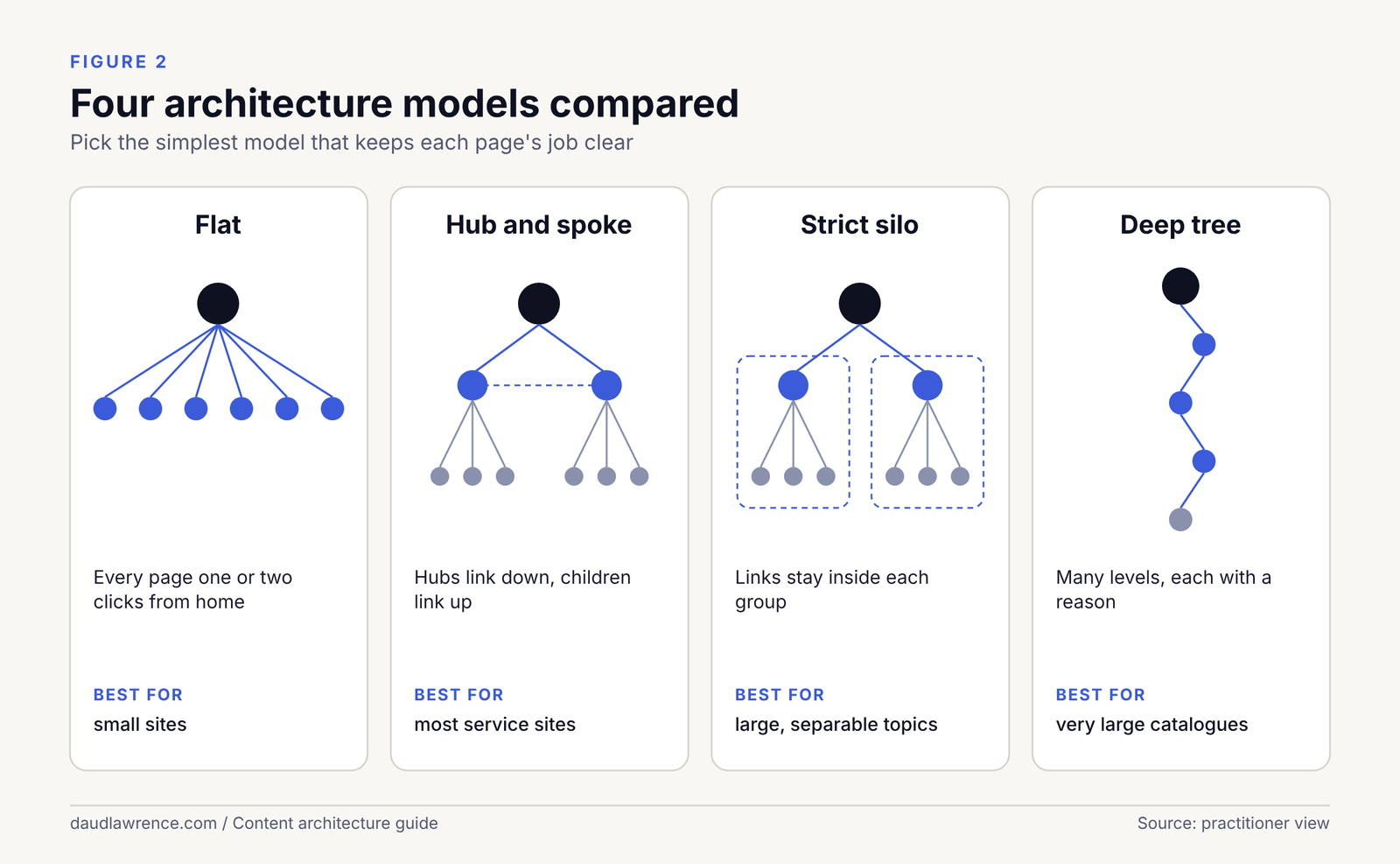
| Model | What it is | Good at | Weak at | Evidence |
|---|---|---|---|---|
| Flat | Most pages are a click or two from the home page | Easy to reach; simple | Hard to show grouping on large sites | Practitioner view |
| Deep | Many levels of folders and categories | Shows detailed grouping | Important pages buried; long URLs | Practitioner view |
| Pillar and cluster | One broad page, many narrower pages that link to it and back | Shows which page is the hub | Needs real narrow pages, not thin ones | Practitioner view |
| Silo | Groups of pages on one theme, linked mainly to each other | Keeps themes tidy | Blocks helpful links between themes if enforced strictly | Practitioner view |
| Hub and spoke | A hub page for a service and spokes for its parts | Matches how buyers explore a service | Same as pillar and cluster | Practitioner view |
What Google has actually said
Google does not name any of these shapes. Its starter guide says to organise a site logically, that using directories to group similar topics “can help Google learn how often” URLs in a directory change, and that the choice between subdomains and subdirectories is “do whatever makes sense for your business” [14]. Its link guidance asks that every page you care about is linked from another page, and that links sit in a relevant context [15]. That is the confirmed floor.
Click depth
Many practitioners quote a number, such as “three clicks or fewer”. I found no number in the Google documents I read [15][14][24]. Treat click depth as a Practitioner view: a page that takes many steps to reach is probably less useful to people and harder for crawlers, but I cannot give you a Google-backed threshold. Measure your own site’s depth with a crawler and look for important pages that are buried.
How the approach changes with size
Google’s guidance on crawl budget says it is for “large sites (1 million+ unique pages)” that change weekly, or “medium or larger sites (10,000+ unique pages)” that change daily [24]. A 10-page, 100-page or 1,000-page service site is far below those thresholds. For Google’s crawlers, the main job of architecture on a small site is clarity, not crawl efficiency. My approach by size is below. It is a Practitioner view.
| Site size | Typical shape | What to do | What to skip |
|---|---|---|---|
| About 10 pages | Flat: home, services, pricing, about, contact | One page per real job. Link every page from the menu and from related text | Silos, tags, deep folders |
| About 100 pages | Hub and cluster per service line | A hub per service, supporting pages that link up and across. A short list of area pages that earn their place | Mega menus; category archives with no content |
| About 1,000 pages | Several hubs, shared pages, a taxonomy | Taxonomy rules, a link audit, a plan for facets and pagination, crawl monitoring | Letting each team invent its own URL pattern |
Google says a sitemap may not be needed for sites of “about 500 pages or fewer” if they are “comprehensively linked internally” [25].
When not to use silos
A strict silo forbids links between sections. I would not use one when buyers move between topics. A person reading about office cleaning prices should be able to reach the page on contract terms, which sits in a different section. Google’s request is that related pages are linked in context [15]. Nothing in the documents I read asks you to limit links to a theme. For a small site, a silo is extra rules with little to protect. I use the idea of grouping, not the rule of isolation.
URL rules
A URL is the address of a page. It is also the first label a person and a crawler see for it. Google’s guidance on URLs is short, and most of what circulates online is more detailed than what Google says. I separate the two.
What Google says
- “When possible, use readable words rather than long ID numbers in your URLs” [26].
- “We recommend separating words in your URLs, when possible,” and hyphens are preferred over underscores [26].
- “Whenever possible, shorten URLs by trimming unnecessary parameters” [26].
- For sites in more than one region, “consider using a URL structure that makes it easy to geotarget your site” [26].
- Words in a URL are a small signal. Google’s starter guide says keywords in the domain or URL path “have hardly any effect beyond appearing in breadcrumbs” [14].
All of these are Confirmed by Google. Notice what is missing. There is no length limit, no rule about folders, no rule about the number of words. Rules such as a maximum number of characters circulate among practitioners, but I found no Google source for them.
The rules I follow
These are my working rules, a Practitioner view. I choose them to make URLs stable and readable for people, not to rank.
- One page, one URL. Pick one preferred address for each page and use it everywhere: in links, in the sitemap and in the canonical tag.
- Readable words in the page’s own language. Use the words a reader would use for the page. For the US example, that means American spelling and terms.
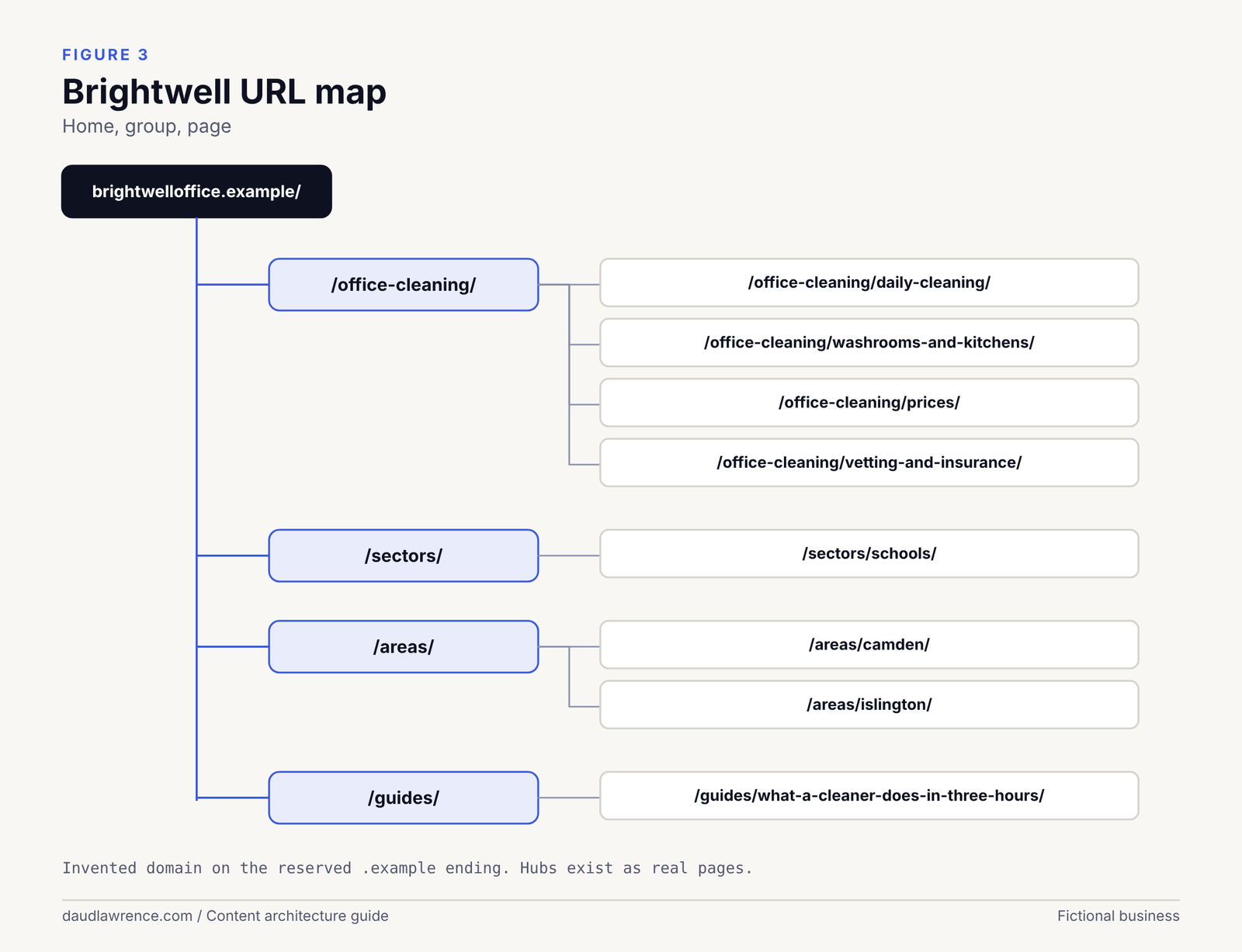
- Group with folders only when the grouping is real. A folder should be a hub that exists as a page. If
/office-cleaning/is a folder, it should also be a page. - Three levels at most for a small business site. Home, group, page. More depth is possible, but each level needs a reason.
- No dates or years in the address of an evergreen page. “Prices 2026” in a URL turns into a redirect next year.
- Lowercase, hyphens, no spaces or special characters.
- Do not change a URL without a reason. Every change creates work (see the section on restructuring).
What a plan looks like for the two businesses
Both address lists are invented. The “.example” ending is reserved, so these addresses cannot belong to a real site.
| Page | Brightwell (London) | Prairie Line (Chicago) |
|---|---|---|
| Home | brightwelloffice.example/ | prairielinejanitorial.example/ |
| Hub | /office-cleaning/ | /janitorial-services/ |
| Service | /office-cleaning/daily-cleaning/ | /janitorial-services/day-porter/ |
| Service | /office-cleaning/washrooms-and-kitchens/ | /janitorial-services/restroom-care/ |
| Definition page | Not needed | /cleaning-vs-janitorial/ |
| Pricing | /office-cleaning/prices/ | /commercial-cleaning-costs/ |
| Trust | /office-cleaning/vetting-and-insurance/ | /janitorial-services/insurance-and-training/ |
| Specialist or sector | /sectors/schools/ | /specialist/medical-facilities/ |
| Area | /areas/camden/ | /areas/oak-brook/ |
| Question | /guides/what-a-cleaner-does-in-three-hours/ | /guides/day-porter-vs-night-crew/ |
Three differences matter. The hub name follows the main label in each market (“office cleaning” in the UK, “janitorial” in the US, as the first guide’s data showed). The UK pricing page says “prices” and the US page says “costs”, because that is what each audience types. And the US site needs a definition page that the UK site does not.
Where my study fits
In my sample, 6 of 10 London sites placed service pages directly under the domain, with no folder, and 4 used one folder level. In Chicago, 3 of 9 used flat paths, and the franchise sites used long paths of four to six segments, such as a location folder, a franchise name and a service folder [1]. These sites all rank for at least one of my study queries, so no shape is excluded. I did not test whether one shape ranks better.
Localised URLs and the region question
If the same business serves the UK and the US, the address design is a decision about structure, not about spelling. I cover the options, with Google’s own comparison table, in the section on UK and US versions below.
Restructuring an existing site
Most real work is not a new build. It is a change to a site that already exists. Google’s starter guide is cautious: “Don’t drop everything and start reorganizing your site right now” [14]. I take that seriously. Restructure when the current structure causes a problem you can name.
Reasons that justify it
- Several pages answer the same question, and none is clearly the best (see the section on cannibalisation).
- Important pages are linked from nowhere.
- URLs are IDs or parameters that nobody can read [26].
- The business has changed, and the site describes an old one.
- A migration is happening anyway.
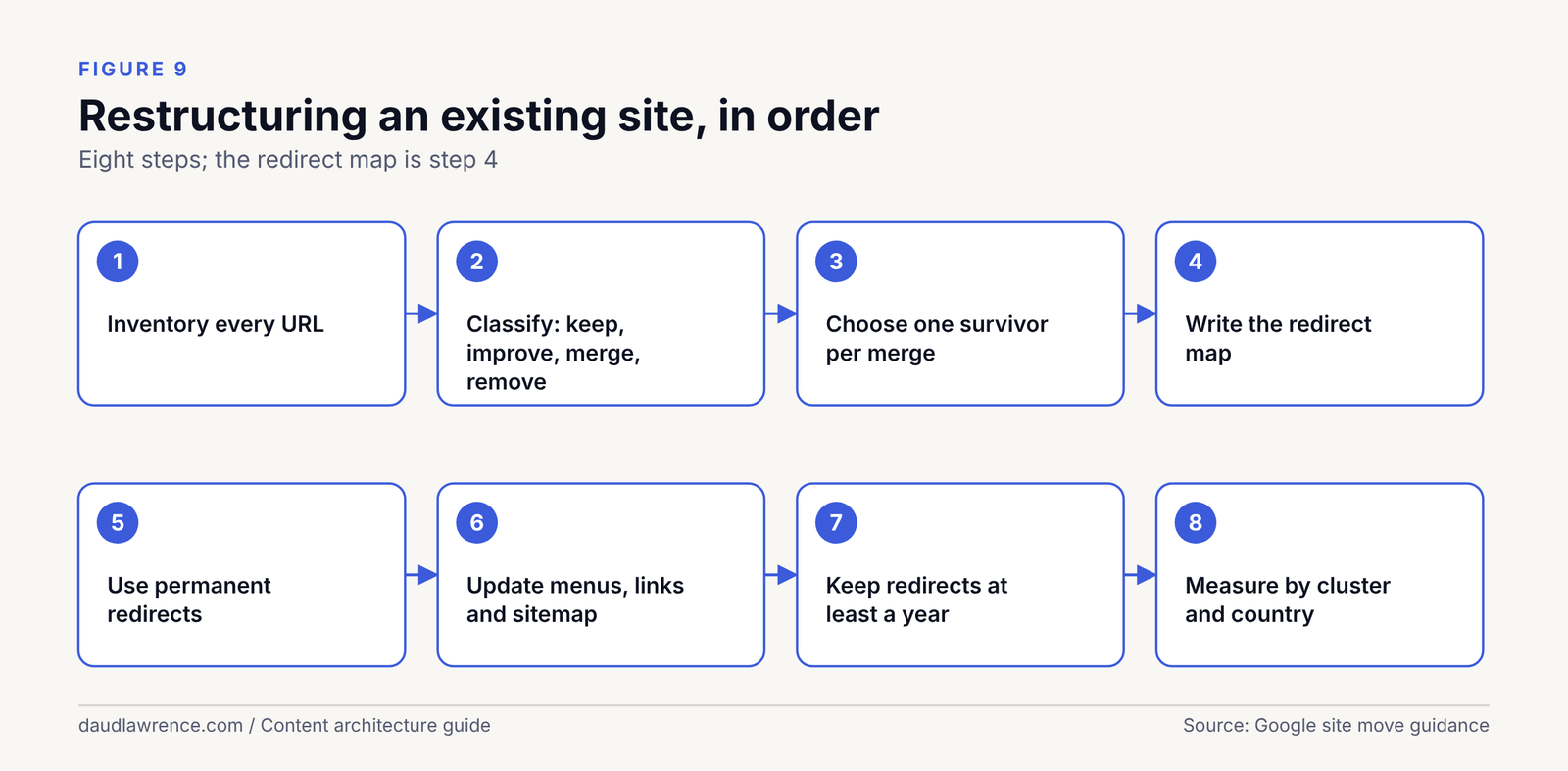
The process, in order
- Inventory every URL. Combine a crawl, the Search Console pages report and your analytics. Include URLs that get impressions but are not linked.
- Classify each URL. Keep as it is, improve, merge into another page, or remove.
- Choose one survivor for each merge. The survivor is the page that best answers the question. Google says it “will decide which pages (if any) are duplicates, based on similarity of content” [27], so the merge should leave one clearly best page.
- Write the redirect map. Every old URL gets a destination. Google says: “It’s important to map your old site’s URLs to the URLs for the new site” [28].
- Use permanent, server-side redirects. Google recommends “server side permanent redirects from the old URLs to the new URLs as you indicated in your mapping” [28]. Permanent redirects such as 301 and 308 are a strong canonical signal. A temporary redirect such as 302 is not used as a signal that the target should be canonical [29].
- Update your own links. Point menus, body links and the sitemap at the new URLs, so that no one travels through a redirect. Google asks you to submit the new sitemap in Search Console [28].
- Remove what should go. For pages that are gone for good with no equivalent, return 404 or 410. Google’s crawl budget guide covers how it treats 404 and 410 pages [24].
- Keep the redirects. Google says to keep them “for as long as possible, generally at least 1 year” [28].
- Measure. Set a hypothesis first, by cluster and by country, using the measurement plan in the first guide.
A worked example
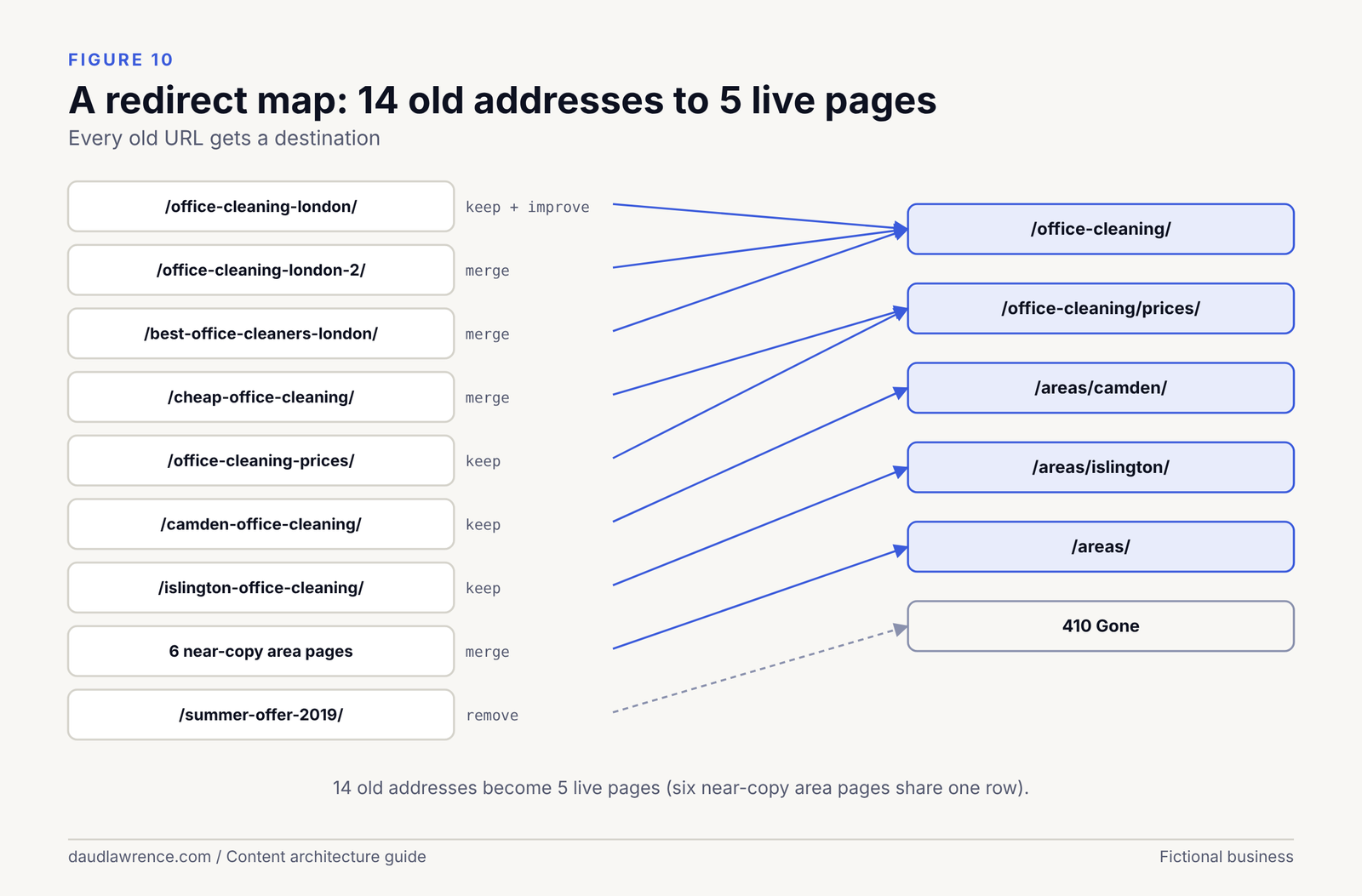
Brightwell’s old site is invented for this example. It has 14 pages about office cleaning in London, grown over years. The map below shows the decisions.
| Old URL | Problem | Action | New URL |
|---|---|---|---|
/office-cleaning-london/ | Best page, but the title is vague | Keep and improve | /office-cleaning/ |
/office-cleaning-london-2/ | Near-copy of the page above | Merge | /office-cleaning/ |
/best-office-cleaners-london/ | Claims, no detail | Merge | /office-cleaning/ |
/cheap-office-cleaning/ | Unrelated price claims | Merge into the price page | /office-cleaning/prices/ |
/office-cleaning-prices/ | Real content, orphaned | Keep and link | /office-cleaning/prices/ |
/camden-office-cleaning/, /islington-office-cleaning/ | Real local detail | Keep | /areas/camden/, /areas/islington/ |
| Six other area pages | The same text with the place name swapped | Merge into one areas index | /areas/ |
/summer-offer-2019/ | Expired | Remove | 410 |
The result is 14 old addresses becoming 5 live pages: the hub, the price page, two area pages and an areas index. Three old addresses redirect to the hub, two to the price page, two move to new area addresses, six redirect to the areas index, and one returns 410. Check this against reality: I do not know whether a real business would see better rankings after such a change, and Google does not say that removing pages lifts the rest. Treat it as a hypothesis, then measure.
Mistakes to avoid
- Redirecting everything to the home page. I could find no Google document on this, so it is my Inference: sending an old page to an unrelated one gives a visitor something they did not ask for, and Google’s crawl documentation warns that soft 404 pages keep getting crawled [24].
- Chains. An old URL that redirects to a URL that redirects again wastes visits. Google asks you to avoid long chains [24].
- Using noindex to pick between duplicates. Google does not recommend it for choosing a canonical page within a site [27].
- Forgetting the sitemap. Old URLs in the sitemap contradict the redirects [28].
Crawl and technical structure
Architecture only works if crawlers can follow it. This section covers the technical points that decide that.
Links Google can and cannot follow
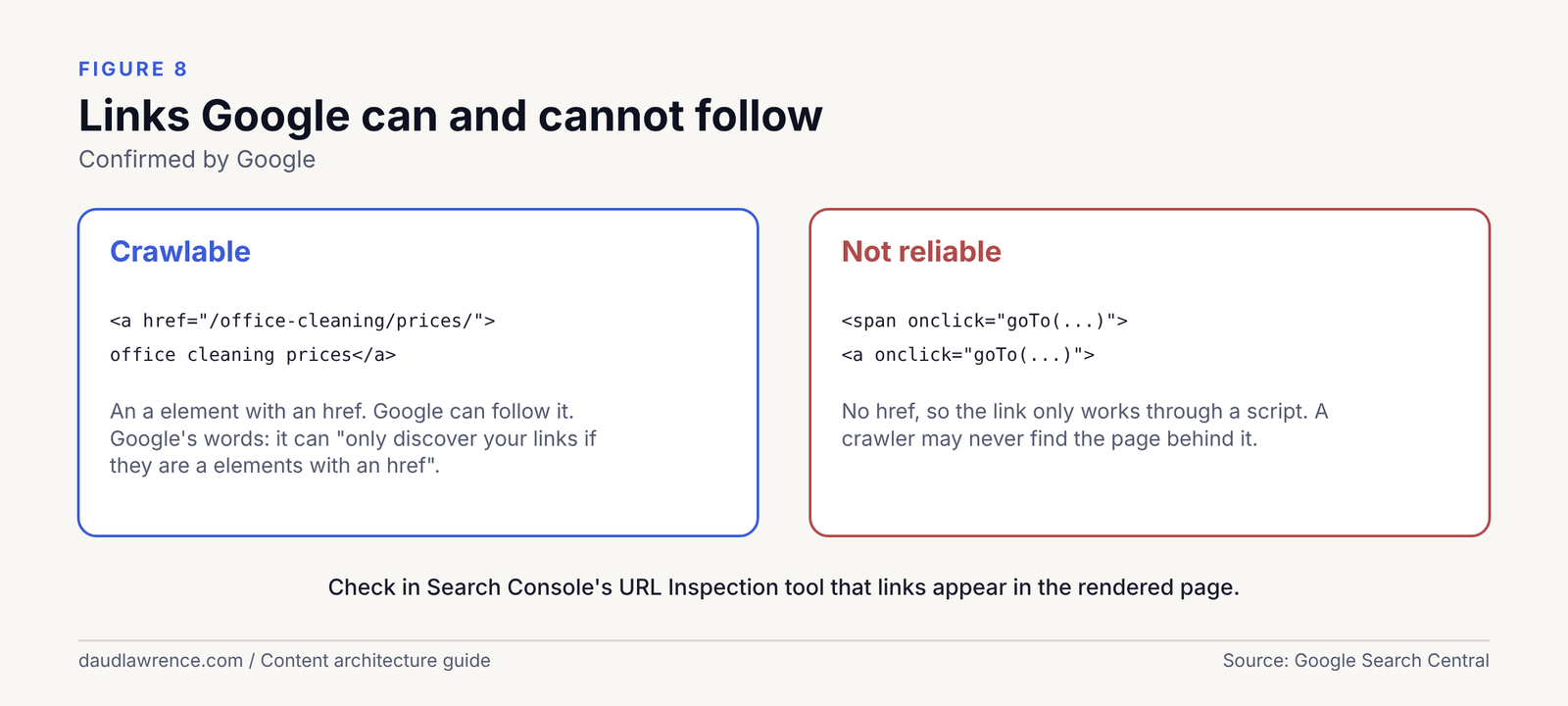
Google says: “Generally, Google can only crawl your link if it’s an <a> HTML element” [15], and that it can “only discover your links if they are <a> HTML elements with an href attribute” [30]. These are Confirmed by Google.
<!-- Crawlable: an a element with an href -->
<a href="/office-cleaning/prices/">office cleaning prices</a>

<!-- Not reliable: no href, the link only works through a script -->
<span onclick="goTo('/office-cleaning/prices/')">office cleaning prices</span>
<a onclick="goTo('/office-cleaning/prices/')">office cleaning prices</a>
JavaScript
Google processes JavaScript pages in three phases: crawling, rendering and indexing. Rendering happens when “Google’s resources allow” [30]. It is “fine to use JavaScript to inject links into the DOM”, as long as the result is a standard crawlable link [30]. Single-page applications should use the History API and should not “use fragments to load different page content” [30].
For anyone checking a site, the practical test is to view the rendered page in Search Console’s URL Inspection tool and confirm the links are present there [15]. A menu that only exists after a user hovers or clicks is a risk. In my study, the text version of each page did not always show every dropdown, so I could not count them (see the study section).
Faceted navigation, filters and parameters
Faceted navigation lets visitors filter a list. Google warns that crawlers “will typically access a very large number of faceted navigation URLs” and that crawling them takes time away from useful URLs [31]. Its options are to disallow crawling of those URLs in robots.txt, to use URL fragments (which have no impact on crawling), or to use rel="canonical" or rel="nofollow", which it says are “generally less effective in the long term” [31]. It also says to return a 404 for filter combinations that have no results [31].
A typical service business has few or no facets. If a site has a filterable case-study list, apply these rules. If it is a shop, this topic is large and deserves its own guide.
Pagination
Google’s rules are short: “Give each page a unique URL,” do not “use the first page of a paginated sequence as the canonical page,” and link between pages with <a href>[32]. Google says it no longer uses rel="next" and rel="prev"[32]. For a service site, this mostly applies to a blog or news archive.
Click depth and crawl budget
Click depth is the number of steps from the home page. I found no Google number for it [15][14][24]. Crawl budget is about how many URLs Google will crawl on a site, and Google says its guide is for sites with a million or more pages that change weekly, or 10,000 or more pages that change daily [24]. A small service site is outside both groups. For such a site, depth matters because of people and clarity, not budget. That is my Practitioner view.
XML sitemaps and HTML sitemaps
An XML sitemap lists the URLs you want crawled. Google says a sitemap “doesn’t guarantee that all the items in your sitemap will be crawled and indexed” [25], that small and well-linked sites may not need one [25], and that it is a weak signal when choosing a canonical URL [27]. I still include one, because it costs little and Search Console reports on it. List only canonical, indexable URLs.
An HTML sitemap is a page for people. Google’s starter guide does not mention it [14]. I treat it as a Practitioner view: it can help people on large sites and adds little on a small one.
Which tool to use
| Tool | What it does | Google’s wording |
|---|---|---|
| Internal link | Lets crawlers and people find a page | “Every page you care about should have a link from at least one other page on your site” [15] |
rel="canonical" | Says which of several similar URLs you prefer | “A strong signal that the specified URL should become canonical” [27] |
| Redirect | Sends a moved page to its new address | Permanent redirects are used as a canonical signal [29] |
| Sitemap | Lists URLs you want found | “A weak signal” for canonical choice [27] |
| robots.txt | Asks crawlers not to fetch URLs | Recommended for faceted URLs you do not want indexed [31] |
noindex | Keeps a page out of the index | Not recommended for choosing a canonical page within a site [27] |
rel="nofollow" | Marks a link you do not want followed | Links marked with these attributes “will generally not be followed” [33] |
Internal linking in depth
An internal link is a link from one page of a site to another page of the same site. The first guide gives the short version. This section gives the working rules.
What Google says
Three points, all Confirmed by Google, from its link documentation [15]:
- “Every page you care about should have a link from at least one other page on your site.”
- “Good anchor text is descriptive, reasonably concise, and relevant to the page that it’s on.”
- Links are crawlable when they are
<a>elements with anhref, including when JavaScript inserts them.
Google’s starter guide adds that links are how most new pages are found [14]. It gives no number of links per page, no ideal anchor wording and no rule about footers or menus.
The types of internal link
| Type | Where it sits | What it is for | Evidence |
|---|---|---|---|
| Navigation | Header, menu | Orientation: where the main sections are | Practitioner view |
| Footer | Bottom of every page | Reach for legal pages, key services and areas | Practitioner view |
| Breadcrumb | Top of the page | Shows position in the hierarchy | Google documents breadcrumb markup [34] |
| Contextual | Inside body text | Explains why the next page matters | Google asks for links “in context” [15] |
| Related links | A block at the end | Next steps for readers | Practitioner view |
| Hub index | A list on a hub page | Links the hub to all its children | Practitioner view |
| Pagination | Archive pages | Moves between pages of a list | Google gives rules [32] |
Anchor text
Anchor text is the clickable words. Google’s rule is that it is descriptive, concise and relevant [15]. In practice I follow four habits:
- Write the anchor so it makes sense on its own, without the sentence around it.
- Describe the target, not the action. “What a daily clean covers” is better than “click here”.
- Vary the wording across links to the same page, because people ask for the same thing in different words. Do not force a variation that reads badly.
- Keep the exact page name for navigation and breadcrumbs, where consistency helps a reader.
The first two follow Google’s wording. The last two are my Practitioner view.
How many links
Google gives no number [15]. Practitioners often quote numbers or ratios, but I found no Google source for them. I use a checklist instead of a count, also a Practitioner view:
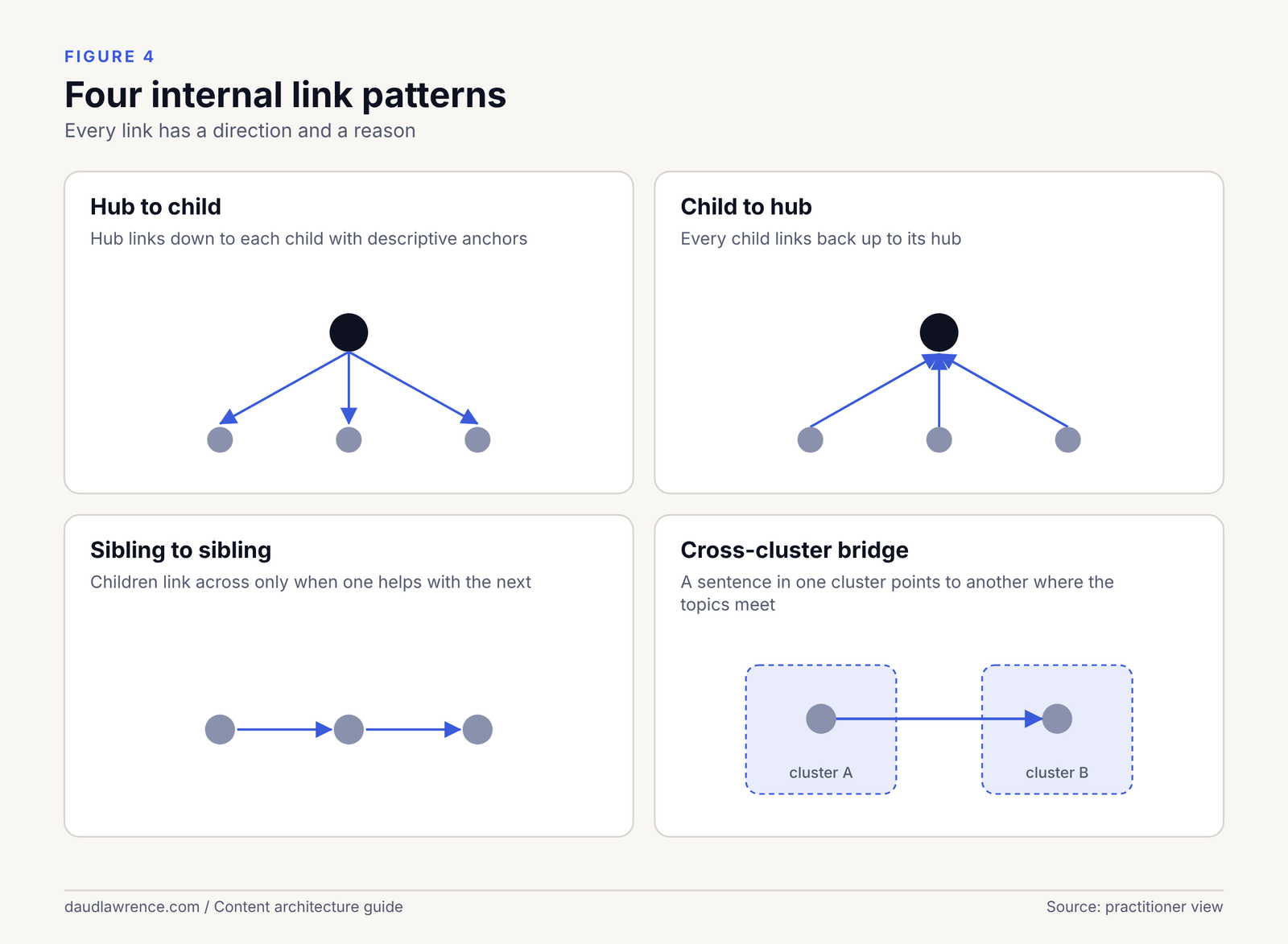
- Every page has one link up to its hub.
- Every hub links to each of its children.
- Related pages link to each other where a reader would want the next step.
- No page is a dead end.
- A link that a reader would not want is removed, however useful it looks to a tool.
Orphan pages
An orphan page has no internal links pointing to it. Google asks that every page you care about is linked from another page [15]. Google’s sitemap documentation says a sitemap helps search engines find URLs, but does not guarantee crawling or indexing [25]. So an orphan may be found through a sitemap or an outside link, but it gives Google no site context. To find orphans, compare the URLs in your sitemap and analytics with the URLs a crawler reaches by following links. Anything in the first list and not the second is an orphan.
Breadcrumbs
A breadcrumb trail shows where a page sits, for example Home, Office cleaning, Prices. For Google’s markup, the list needs at least two items, and each item needs item, name and position[34]. Google also recommends breadcrumbs that reflect “a typical user path” and not the URL structure [34]. In my study, one London site and two Chicago sites showed a clear trail [1]. For a small site with one level of hubs, a breadcrumb is a small addition with a clear purpose.
Link attributes
Google’s documentation names three attributes: nofollow, sponsored and ugc. Links marked this way “will generally not be followed,” though the target “may still be crawled” if it is found another way [33]. For internal links, Google’s guidance points to a robots.txt rule if you do not want a page crawled, and not nofollow[33]. I do not use nofollow on internal links.
A worked example: the Brightwell links
The table shows the main contextual links for the Brightwell hub, using the pages from the first guide’s London map. The anchors are examples.
| From | To | Example anchor | Why a reader wants it |
|---|---|---|---|
| Hub: Office cleaning | Daily cleaning | “what a daily clean covers” | The first service question |
| Hub | Prices | “how office cleaning is priced” | The cost question |
| Daily cleaning | Washrooms and kitchens | “washroom and kitchen cleaning” | A related service |
| Daily cleaning | Vetting and insurance | “how we vet and insure our cleaners” | Trust before booking |
| Prices | Contract length question | “how long a contract runs” | Price depends on term |
| Prices | Daily cleaning | “what is included in the hours” | What the price buys |
| Question: three-hour shift | Daily cleaning | “daily office cleaning” | The service behind the question |
| Camden (area) | Hub | “office cleaning across London” | The wider service |
For Prairie Line, the equivalent set adds links to and from the “cleaning versus janitorial” page, because many pages mention both terms and the reader may not know the difference.
Navigation links, contextual links and how link value flows
Two questions sit under internal linking. Does a link in a menu count differently from a link in a sentence? And does a link pass “value” from one page to another? Google has not answered either in the documents I read, so most of what follows is Inferred or a Practitioner view.
What the PageRank patent says
PageRank is Google’s original link analysis method. The patent, filed in 1998 and granted in 2001, describes ranking a page using the ranks of pages that cite it, with each citing page’s rank divided by its number of outgoing links, plus a constant for the chance that a surfer jumps to a random page [35]. The description calls the result a steady-state probability that a random surfer arrives at a page [35]. This is a Confirmed statement about the patent, and not about how Google ranks today. I read the first part of the patent page and the description of the method, not all of it [35].
What the reasonable surfer patent says
A later Google patent, “Ranking documents based on user behavior and/or feature data”, filed in 2004 and granted in 2010, describes weighting links differently [36]. Its idea is a “reasonable surfer”, who is more likely to follow some links than others. It lists features that could affect a link’s weight, such as its position on the page, the size of its text, its anchor text, and whether it is in a footer or sidebar [36]. It describes learning these weights from user behaviour data [36]. I read the abstract and the description, and not all of the page [36].
This is an Inference. The patent shows Google has considered link position and prominence. It does not show that Google uses the method today or how.
What Google’s current documents say
The documents I read do not describe how internal links are weighted. Google’s page on how Search ranks results says one factor in quality is “understanding if other prominent websites link or refer to the content” [37]. That is about links from other sites. It does not mention PageRank and does not discuss internal links [37]. So I make three cautious points, each a Practitioner view built on those patents:
- A link inside relevant body text is probably a stronger and clearer signal than the same link in a footer, because it comes with an explanation. The reasonable surfer patent is consistent with this, and does not prove it [36].
- A page that gives hundreds of links on every page, such as a large mega menu, may dilute each link, if the original PageRank idea applies [35]. I treat it as a reason for restraint, not a rule.
- Pages that matter should receive links from pages that are themselves well linked and on the same topic.
Menus, mega menus and footers
A header menu appears on every page, so each page links to every item in it. That makes the menu good for orientation, and a poor place to explain why a page matters. A mega menu is a large menu that opens to show many links. They help on large sites with many sections. On a 10-page or 100-page service site, I prefer a short header and contextual links for depth. A footer can carry legal pages, contact details and the main services. In my study, several London sites carried area links in the footer or in a second “areas” block, and one carried the same area list twice on a page [1]. Repeating a long list on every page spends link attention on pages that may not deserve it.
A practical summary
| Link location | Likely role | Confidence |
|---|---|---|
| Header | Orientation to the main sections | Practitioner view |
| Footer | Access to legal pages and key pages | Practitioner view |
| Breadcrumb | Position and a link up | Google documents the markup [34] |
| Body text | Context for the next page | Inferred from the reasonable surfer patent [36] |
| Hub index | Complete list of a hub’s children | Practitioner view |
Cannibalisation, doorway pages and location pages
Three problems share one root cause. A site makes more than one page for the same job.
Keyword cannibalisation
Keyword cannibalisation is a practitioner term for two or more pages on one site that serve the same query and intent, so none is clearly the best. Google does not use the term in the documents I read. What Google does document is that it groups similar pages and chooses one: it “will decide which pages (if any) are duplicates, based on similarity of content” [27]. I treat it as a Practitioner view about a real mechanism: similar pages compete for the same slot.
How architecture causes it
- A hub and a service page both aim at “office cleaning London”.
- Area pages repeat the same text with a place name swapped.
- A blog post and a service page answer the same question.
- Archives, tags and filters create more URLs for the same content.
- A merger leaves old and new pages live side by side.
How architecture prevents it
Give every page one primary question, and write it down (the four-question test earlier in this guide). A map with one question per page is the best defence, because a duplicate stands out at once. Link between near neighbours with distinct anchor text, so a reader and a crawler can see how they differ.
How to find and fix it
- In Search Console, open the Performance report, filter to one query, and view the Pages tab [38]. Several of your URLs getting impressions for the same query is a signal to look, not proof of a fault.
- Compare the pages. If they answer different questions, change their titles and headings so the difference is clear.
- If they answer the same question, pick the better page and merge the other into it with a permanent redirect [28].
- If both must stay, set a canonical on the one you prefer [27] and link to the preferred page.
| Situation | Fix |
|---|---|
| Two pages, same intent, one clearly better | Merge and redirect |
| Two pages, different intent, similar titles | Rewrite titles and headings to show the difference |
| Many near-copies by place name | Merge into an index and keep only pages with local detail |
| A blog post and a service page for the same query | Make the post answer a narrower question and link to the service page |
Doorway pages
Google’s spam policy defines the line: “Doorway abuse is when sites or pages are created to rank for specific, similar search queries” and “they lead users to intermediate pages that aren’t as useful as the final destination” [2]. Its examples include “multiple domain names or pages targeted at specific regions or cities that funnel users to one page” and “substantially similar pages that are closer to search results than a clearly defined, browseable hierarchy” [2]. These are Confirmed by Google.
The policy does not say that area pages are banned. It says pages made to rank for similar queries that funnel people onward are spam. The test is whether the page helps the reader.
Location pages: where I draw the line
My working test is this: if you can swap the place name and the page stays true, it is a doorway risk. A useful area page contains facts that are true of that area and nowhere else. This is a Practitioner view, built on the policy wording [2].
| Brightwell (London) | Prairie Line (Chicago) | |
|---|---|---|
| Weak area page | “Office cleaning in Camden. We clean offices in Camden to a high standard.” | “Janitorial services in Oak Brook. We clean buildings in Oak Brook.” |
| What makes one useful | Building types served in the area, access and time windows, how supplies are delivered, the vetting and insurance that apply there, response time from the nearest team | Building types, the suburbs and neighbourhoods served, service days, contract options, who to call, the nearest crew base |
| Test | Could this page be copied to Islington with one word changed? | Could this page be copied to Schaumburg with one word changed? |
Google’s own local profile guidance gives a related frame. A service-area business should have one profile, and should hide its address [21]. That suggests a site should describe a real service area and not claim a presence in places it does not serve.
What my study saw
In my sample, 6 of 10 London sites and 6 of 9 Chicago sites linked individual area pages. London lists reached 12, 18, 21 and 41 links, and one Chicago site linked 18 suburb pages [1]. I read only the menus and links, not the pages, so I make no judgement about whether any site’s pages are useful. The point is that this pattern is common among sites that rank, and that it is also the pattern Google’s policy asks owners to handle with care [2].
UK and US versions of a site
A business may serve one country, two, or more. The question is whether it needs one site, several sites or one site with sections.
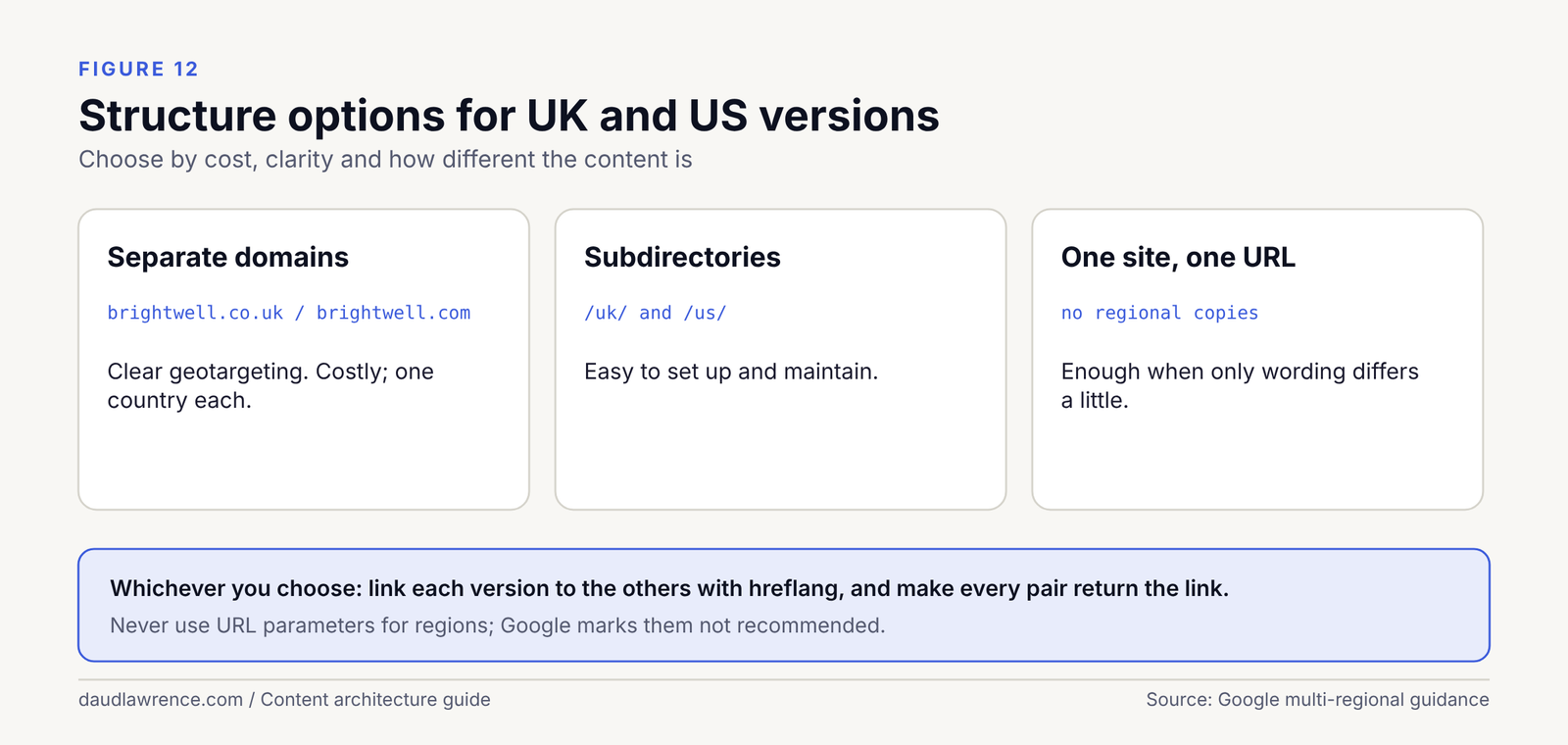
When one site is enough
If the business serves one market, you need one site. If it serves the UK and the US with the same service, and the pages differ only in spelling, one site with a clear split may be enough. If the markets use different words, different prices, different credentials and different directories, which the first guide’s London and Chicago examples do, separate pages written for each market work better. For Brightwell and Prairie Line, the services are the same, the labels are not.
The structure options
Google’s multi-regional documentation gives a comparison. In short [39]:
| Option | Example | Strengths | Weaknesses |
|---|---|---|---|
| Country-code domain | example.co.uk | Clear geotargeting; easy separation | Costly; can only target one country |
| Subdomain | uk.example.com | Easy to set up; separate servers possible | Users may not recognise the geotargeting |
| Subdirectory | example.com/uk/ | Easy to set up; low maintenance | Users may not recognise the geotargeting; single server location |
| URL parameters | example.com?loc=uk | None | “Not recommended” |
For a small business with two markets, I would choose subdirectories, as the maintenance is lowest. That is a Practitioner view. Google says either choice is valid and describes the trade-offs [39].
What hreflang does
Hreflang is a set of annotations that tells Google which language or regional version of a page to show to which searcher. Google’s rules, all Confirmed, are [40]:
- “If two pages don’t both point to each other, the tags will be ignored.”
- “Each language version must list itself as well as all other language versions.”
x-defaultis for “when no other language/region matches” the user’s setting.- The three ways to declare it (HTML
<link>tags, HTTP headers and an XML sitemap) “are equivalent from Google’s perspective.”
For a hypothetical company that has both a UK and a US section, the HTML version looks like this. The domain is invented.
<link rel="alternate" hreflang="en-gb" href="https://www.example-cleaning.example/uk/office-cleaning/" />
<link rel="alternate" hreflang="en-us" href="https://www.example-cleaning.example/us/janitorial-services/" />
<link rel="alternate" hreflang="x-default" href="https://www.example-cleaning.example/" />
The same three lines go on both pages, including the page itself.
Canonical tags and the two versions
Google says that “localized versions of a page are only considered duplicates if the main content of the page remains untranslated” [40]. A UK page and a US page that differ only by spelling are close to duplicates. Google’s advice for similar content in the same language across regions is to “pick a preferred version and use the rel=”canonical” element and hreflang tags” [39]. My approach is simpler: write each market’s page for its market, so they are different pages with different content, and give each page a canonical that points to itself. The self-canonical habit is a Practitioner view. The documents I read do not state it.
What hreflang does not do
It does not raise rankings. Google’s stated aim is “to make sure that the correct language or regional URL is served to searchers” [39]. It also does not fix thin or copied content. A US page that is a UK page with “organisation” changed to “organization” is a weak page, with or without hreflang.
Stage 2 in full: from topical map to site architecture
The first guide’s method has four stages. Stage 2 is “map the topic architecture” in the Semantic SEO guide. The first guide shows how the map was made, from the vocabulary and questions in stage 1. I do not rebuild it. I start from its result: the Brightwell map in that guide’s Figure 7, which has a hub, six clusters and a publishing order.
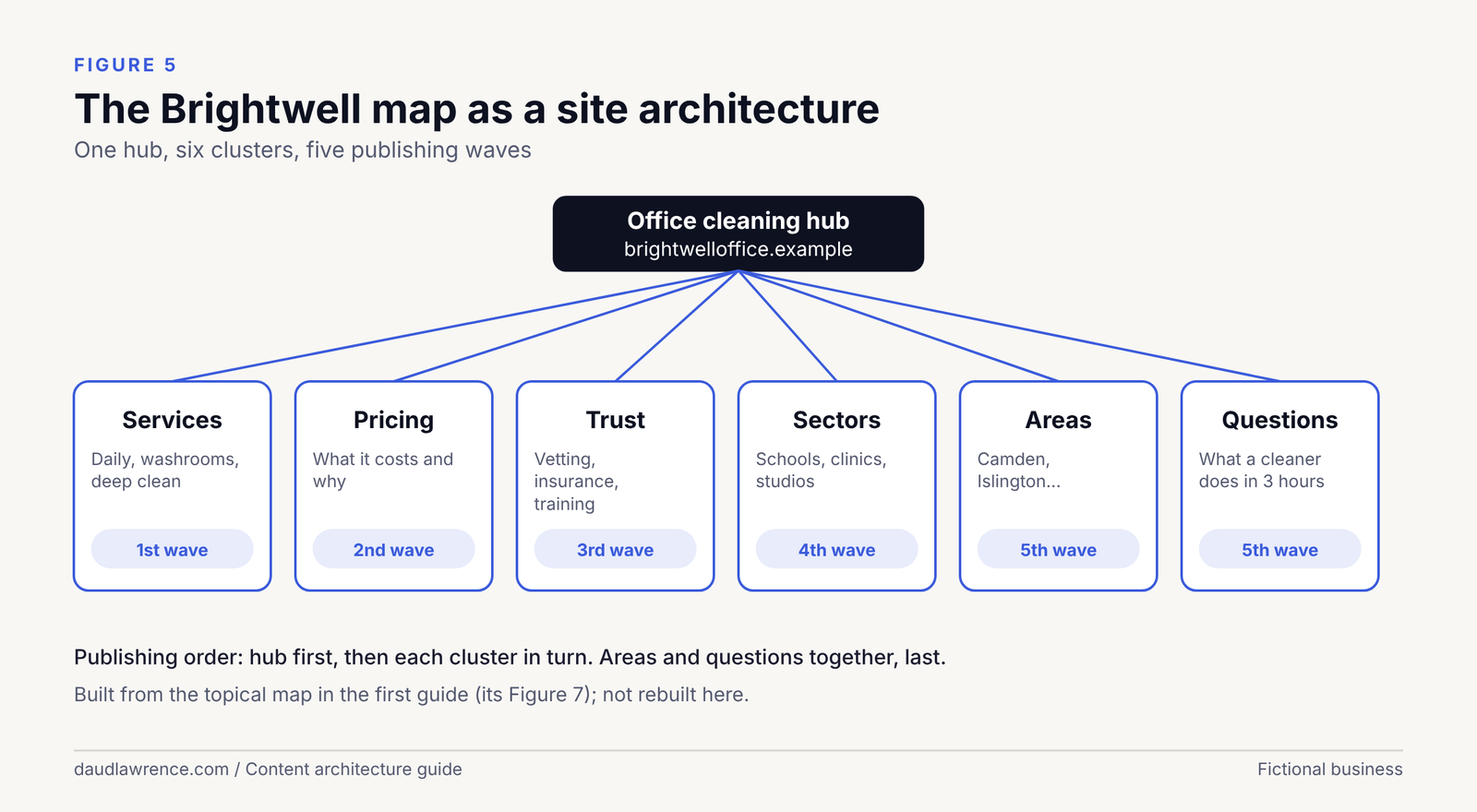
What the map gives you
The map from the first guide gives a hub (Office cleaning in London), six clusters (Services, Pricing, Trust, Sectors, Areas, Questions), the pages in each, and a publishing order. It does not give URLs, menus, links or labels. Stage 2, as I run it, adds these in six steps.
Step 1: give every page a type, a URL and a primary entity
| Map item | Page type | URL | Primary entity |
|---|---|---|---|
| Hub | Hub | /office-cleaning/ | The service, in London |
| Daily cleaning, deep cleaning, washrooms and kitchens | Service | /office-cleaning/daily-cleaning/ and so on | A specific service |
| Pricing | Attribute page | /office-cleaning/prices/ | The service’s price |
| Vetting, insurance and standards | Trust page | /office-cleaning/vetting-and-insurance/ | The business’s credentials |
| Offices, schools, healthcare | Sector | /sectors/schools/ | The service for one building type |
| Areas served | Area index and pages | /areas/, /areas/camden/ | The service in one area |
| Questions | Guide | /guides/what-a-cleaner-does-in-three-hours/ | A concept or a task |
Step 2: decide the navigation
A short header with the sections a buyer needs: Office cleaning, Sectors, Areas, About, Contact. A footer with legal pages and the key services. A breadcrumb on every page below the home page. Nothing else goes in the header.
Step 3: plan the link graph
Set the required links by page type, then add contextual links for each pair that a reader would want.
| Page type | Must link to | Must be linked from |
|---|---|---|
| Hub | All its children | Home page, header |
| Service | Hub, prices, trust page | Hub, related services, sector pages |
| Prices | Services, hub | Hub, every service |
| Trust | Hub, services | Every service, home page |
| Sector | Hub, the relevant services | Hub, header |
| Area | Hub, the relevant services | Areas index |
| Question or guide | The service it relates to | The relevant service |
Step 4: plan the labels
For each page, decide its title, heading, breadcrumb and structured data type before writing. The markup sections below show the types.
Step 5: set the publishing order and the links at each stage
Publish in the first guide’s order: hub, services, pricing, trust, sectors, then areas and questions. Add a link only when its target exists. A link to a page that is not live is a broken link. After each batch, add the links from the earlier pages to the new ones.
Step 6: check
- Does any page have two jobs, or any job lack a page?
- Is any page an orphan?
- Does every child link up, and does every hub link down?
- Is there exactly one URL for each page?
- Does the sitemap list only canonical, indexable URLs?
The Chicago difference
Prairie Line’s map has a definitions page, “cleaning versus janitorial”, that the London map does not need. In the architecture, I put it outside the hub’s folder, at /cleaning-vs-janitorial/, because many pages across the site will link to it. The hub introduces it near the top. Its primary entity is a concept, and the business appears only as the author of the answer.
Keeping the map alive
A map is a living plan. After publishing, use Search Console by country and cluster to see which pages get impressions, and which questions have no page [38]. The first guide’s measurement section explains how.
Structured data in depth
Structured data is code added to a page that describes its content in a fixed vocabulary. It is for machines. A visitor never sees it. The vocabulary is schema.org, and Google reads it in several formats [41].
What it does and does not do
Be careful here, because some guides promise more than Google does.
- Google says it “uses structured data that it finds on the web to understand the content of the page”, and that adding it “can enable search results that are more engaging to users” [41]. That is Confirmed by Google.
- Google says it “does not guarantee that your structured data will show up in search results” [23]. Confirmed.
- Google does not say that structured data raises rankings. I found no Google statement to that effect, so I do not claim it.
- Markup must describe what is on the page: “Don’t mark up content that is not visible to readers of the page” [23].
My Practitioner view is that structured data is a way to state, in code, the entities and relationships that the page already states in words. It reduces guessing. It does not replace clear writing.
Why JSON-LD
Google lists JSON-LD as the recommended format [23]. JSON-LD stands for JavaScript Object Notation for Linked Data. It is a block of text in a <script type="application/ld+json"> tag, separate from the visible HTML, so it is easy to add and to remove [42]. Google also says you can use JavaScript to generate the JSON-LD and inject it into the page [30].
What Google supports now
Google’s search gallery lists 25 features that use structured data, including Article, Breadcrumb, Local business, Organization, Profile page and Image metadata [43]. The list changes. The FAQ type is not in the gallery list I read on 16 October 2026 [43]. Google published a post titled “Changes to HowTo and FAQ rich results” in August 2023, but its body did not load for me, so I do not state what it says [44]. I do not recommend FAQ markup for rich results in this guide, and the FAQ section is plain HTML.
Two points follow. First, schema.org has far more types than Google uses. A type that Google does not use for a feature can still describe your content, but you should not expect a visible result [41]. Second, check the gallery before you build, not after.
Which type for which job
| Type | Use it for | Google’s required properties | Notes |
|---|---|---|---|
Organization | The business, on the home page and the about page | None; “we recommend adding as many properties that are relevant to your organization” [20] | name, url, logo, sameAs, contactPoint are the useful ones |
LocalBusiness (or a subtype) | A business with a public address people visit | address and name[18] | Service-area businesses are told to hide their address [21], which creates a conflict |
Person | An individual, such as an author or founder | Inside ProfilePage: name[45] | sameAs, jobTitle, worksFor, knowsAbout are properties of Person on schema.org |
WebSite | The site as a whole | name for site names [22] | Must be on the home page [22] |
WebPage | Each page | None for Google | Gives each page an identifier |
Article | An article or guide | None; add the properties that apply [46] | author, datePublished, dateModified |
BreadcrumbList | The trail from the home page to this page | At least two ListItem entries, each with item, name, position[34] | Should reflect a typical user path [34] |
Service | A service the business provides | None for Google | On schema.org: provider, areaServed, serviceType |
Connecting the nodes: @id and @graph
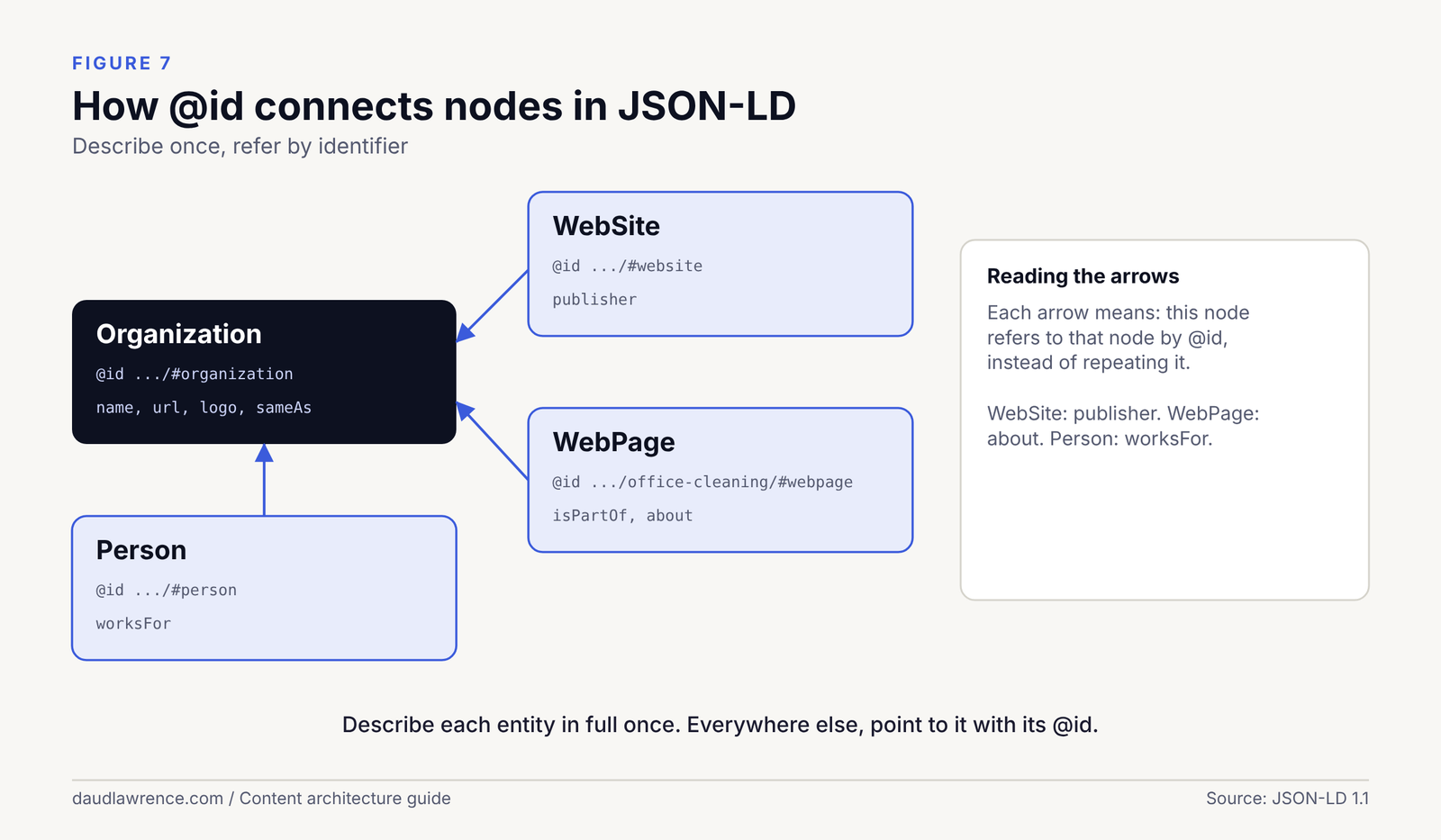
A page often describes several things at once: a business, a web page and an author. If each is a separate block, nothing says they are related. JSON-LD solves this with two keywords.
@idgives a node an identifier, so other nodes can refer to it [42].@graphholds several nodes in one block, so they can point at each other [42].
The convention is to use a URL with a fragment, such as https://brightwelloffice.example/#organization, as the identifier. The fragment does not need to exist as a page. It is only a name. This is a Practitioner view: the JSON-LD specification defines the keywords [42], but I did not find a Google or schema.org document that recommends this naming pattern.
The rule I follow: describe each entity in full once, on its own home page, then refer to it by @id everywhere else.
Example 1: Brightwell as a service-area business
Brightwell Office Care Ltd is fictional. It visits clients’ offices and has no public shopfront, so under Google Business Profile rules it should hide its address [21]. Because Google’s LocalBusiness page requires an address [18], I use Organization, where nothing is required [20], and I state the places it serves with areaServed. That property is defined on schema.org, but it is not listed on Google’s Organization page, so it is for understanding, not for a Google feature [20].
<script type="application/ld+json">
{
  "@context": "https://schema.org",
  "@graph": [
    {
      "@type": "Organization",
      "@id": "https://brightwelloffice.example/#organization",
      "name": "Brightwell Office Care Ltd",
      "url": "https://brightwelloffice.example/",
      "logo": "https://brightwelloffice.example/images/logo.png",
      "description": "Office cleaning for small and medium offices in London.",
      "areaServed": [
        { "@type": "AdministrativeArea", "name": "Camden" },
        { "@type": "AdministrativeArea", "name": "Islington" }
      ],
      "sameAs": [
        "https://example.com/profile/brightwell"
      ]
    },
    {
      "@type": "WebSite",
      "@id": "https://brightwelloffice.example/#website",
      "url": "https://brightwelloffice.example/",
      "name": "Brightwell Office Care",
      "publisher": { "@id": "https://brightwelloffice.example/#organization" }
    },
    {
      "@type": "WebPage",
      "@id": "https://brightwelloffice.example/office-cleaning/#webpage",
      "url": "https://brightwelloffice.example/office-cleaning/",
      "name": "Office cleaning in London",
      "isPartOf": { "@id": "https://brightwelloffice.example/#website" },
      "about": { "@id": "https://brightwelloffice.example/#organization" }
    }
  ]
}
</script>
What each part does:
@graphholds three nodes in one block.- The Organization has the full description. The WebSite and WebPage point to it with
{ "@id": ... }and do not repeat it. - The
logomust follow Google’s logo rules: at least 112 by 112 pixels, a crawlable and indexable image URL, and one that “looks how you intend it to look on a purely white background” [47]. sameAsis illustrative. The address is a placeholder on a reserved domain.- The
WebSitename only helps site names if this block sits on the home page [22].
Example 2: Prairie Line as a business with a public address
Prairie Line Janitorial LLC is fictional, and I give it a fictional public address so that it meets Google’s requirement for address and name[18]. schema.org has no cleaning-specific type [17], so I use ProfessionalService, a subtype of LocalBusiness. Google says that for several types you “specify them as an array” [18], but one type is enough here.
<script type="application/ld+json">
{
  "@context": "https://schema.org",
  "@type": "ProfessionalService",
  "@id": "https://prairielinejanitorial.example/#business",
  "name": "Prairie Line Janitorial LLC",
  "url": "https://prairielinejanitorial.example/",
  "telephone": "+1-312-555-0100",
  "priceRange": "$$",
  "address": {
    "@type": "PostalAddress",
    "streetAddress": "100 Example Street",
    "addressLocality": "Chicago",
    "addressRegion": "IL",
    "postalCode": "60601",
    "addressCountry": "US"
  },
  "openingHoursSpecification": {
    "@type": "OpeningHoursSpecification",
    "dayOfWeek": ["Monday", "Tuesday", "Wednesday", "Thursday", "Friday"],
    "opens": "07:00",
    "closes": "17:00"
  },
  "areaServed": { "@type": "City", "name": "Chicago" },
  "sameAs": ["https://example.com/profile/prairie-line"]
}
</script>
Google requires address and name, and recommends properties such as telephone, url, openingHoursSpecification and priceRange[18]. The address, number and hours are invented. areaServed and sameAs do not appear on Google’s page [18], so they are there for meaning only. In real use the details must match the visible page and the business profile exactly [23][21].
Example 3: a personal site with Person and Organization
This example shows how a personal knowledge base can state who writes it. The person and the organisation are placeholders. The sameAs addresses below are illustrative and fake. Replace them with your own real profile addresses, and only where those profiles exist.
<script type="application/ld+json">
{
  "@context": "https://schema.org",
  "@graph": [
    {
      "@type": "Person",
      "@id": "https://example.com/#person",
      "name": "Example Author",
      "url": "https://example.com/about/",
      "jobTitle": "Semantic SEO specialist",
      "worksFor": { "@id": "https://example.com/#organization" },
      "knowsAbout": ["Semantic SEO", "Content architecture", "Structured data"],
      "sameAs": [
        "https://example.com/profile",
        "https://example.com/profile-two"
      ]
    },
    {
      "@type": "Organization",
      "@id": "https://example.com/#organization",
      "name": "Example Agency",
      "url": "https://example.com/",
      "sameAs": ["https://example.com/profile-agency"]
    },
    {
      "@type": "ProfilePage",
      "@id": "https://example.com/about/#profilepage",
      "url": "https://example.com/about/",
      "mainEntity": { "@id": "https://example.com/#person" }
    }
  ]
}
</script>ProfilePageneeds amainEntity, and its focus must be “a single person or organization that is affiliated with the overall website” [45]. The Person needsname, andsameAsis recommended [45].worksForandmainEntityuse@id, so the person, the organisation and the page are linked without repetition.knowsAboutis a Person property on schema.org. Google does not document it for a feature, so it is for meaning only.- For an article, the
authorcan point to the same Person by@id. Google says the author’surlshould be “a link to a web page that uniquely identifies the author”, andsameAsis an alternative [46].
Testing and the limits of tests
Run every block through the Rich Results Test and the Schema Markup Validator [48][49]. The first shows what Google can use. The second checks against the full schema.org vocabulary. A passing test does not mean Google will show a feature [23]. I did not run the examples through either tool in preparing this guide, because they are web tools. Check each before use.
Mistakes to avoid
- Marking up what is not on the page[23].
- Repeating whole entities on every page instead of using
@id. - Fake or guessed
sameAslinks. AsameAsaddress says “this is the same entity”. A wrong one asserts something false. - Copying a competitor’s markup with the wrong name, address or logo.
- Chasing retired features. Check the gallery first [43].
Entity home, Knowledge Panels and consistency off the site
An entity home is a practitioner term for the page on your own site that you treat as the main statement of who or what an entity is. It is not a Google term, and Google documents no such page. It is a Practitioner view that helps me decide where to put the full description, the identifier and the sameAs links.
Choosing the entity home
- For a business: the home page, or the about page if the home page is a service page.
- For a person: the about page.
- For a service: the service page itself.
Keep it simple. One entity, one page that describes it in full, with the same name everywhere. The Person example above uses https://example.com/#person as the identifier and ProfilePage on the about page, which Google documents as a type whose focus must be one person or organisation [45].
Knowledge panels
A knowledge panel is the information box that sometimes appears beside results for a known entity. Google’s help page says that “information in a knowledge panel generates automatically based on public information on the web”, that descriptions “can’t be edited”, and that your Google Account “must be verified to represent this knowledge panel” [19]. All of this is Confirmed by Google.
So markup does not create a panel. What you can do is make the facts consistent and easy to find. Google says logo markup “can help Google better understand which logo you want to show”, with no promise of display [47].
Wikidata
Wikidata is a public knowledge base. It can hold an identifier for an entity, and sameAs links often point to it. I tried to read Wikidata’s notability rules for this guide and the page did not load, so I make no claim about who qualifies. Check those rules yourself before creating an entry. Never create entries for a business that does not meet them.
Google Business Profile and consistency
Google’s guidelines say the name “should reflect your business’s real-world name, as used consistently on your storefront”, that service-area businesses “should have one profile”, and that a service-area business “should hide your business address from customers” [21]. For the two fictional businesses: Prairie Line shows its address and Brightwell hides it, which is why the markup examples differ.
My checklist for consistency, a Practitioner view:
- Same business name in the page title, the header, the markup, the profile and the footer.
- Same address and phone number format wherever they are shown.
- Same logo file.
- A
sameAslink only to a profile you control.
Architecture and structured data for AI search
People now ask whether site structure matters for AI answers. I separate what is documented from what I observed.
Confirmed by Google. Google says: “There are no additional requirements to appear in AI Overviews or AI Mode, nor other special optimizations necessary”, and “You don’t need to create new machine readable files, AI text files, or markup to appear in these features” [16]. It lists keeping structured data consistent with the visible text as a general best practice [16].
Observed. On 20 October 2026 I checked the AI Overviews for five US searches and two UK searches [3]. They cited many kinds of site, mostly publishers and tool vendors. For “internal linking seo” in the US, the cited sources included Yoast, Siteimprove, Seobility, SE Ranking, Semrush, Search Engine Land, seoClarity and Moz. In the UK, the same search cited Yoast, Mailchimp, Seobility, Search Engine Land, Semrush, Hive19, SE Ranking and Moz [3]. For “site architecture seo” in the US, the sources included Search Engine Land, Semrush and Search Engine Journal [3]. The UK AI Overview for that query did not load its body, so I record nothing for it.
Inferred. The overlap suggests that pages with a clear single topic, a clear heading structure and an obvious owner are cited often, but I tested no cause, and one day of observations from one location each cannot show one. I do not claim that architecture or markup caused any citation.
What I do recommend follows from the rest of this guide: one question per page, answers placed near the top, entities named the same way across the site, and nothing hidden behind scripts that a crawler cannot follow.
My study: how top-ranking cleaning sites in London and Chicago are built
This is original data. It is small and I describe exactly how it was collected so you can judge it.
Method
- Date: 20 October 2026, between about 17:20 and 17:40 UTC.
- Searches: live search results via the OpenRush tool, set to a location for each query. London: “commercial cleaning london” and “office cleaning london”, from London. Chicago: “commercial cleaning chicago” and “janitorial services chicago”, from Chicago [1].
- Sample: the first company websites to appear, skipping directories, aggregators and social sites. London: 10 sites. Chicago: 10 attempted and 9 readable, made up of 6 organic company sites plus 4 from the local pack, because fewer organic company sites were available.
- Collection: each ranking page was fetched once, and a fixed list of 10 questions was answered from the text of that page: which services are linked, URL shape, area pages, breadcrumbs, pricing page, blog, and whether home services share the menu.
Limits
- The tool returns a text version of the page. It does not show JavaScript menus, hover menus or mobile menus, so menu links may be missing.
- I did not measure link counts across whole sites, schema or click depth.
- The entry page is the page that ranked, which is sometimes an inner page. One page per site.
- Small sample, one day, and the two cities differ in how the sample was built. These are observations, not proof of what causes ranking.
- One Chicago site returned an error page and is reported as unreadable. One redirected to a different domain and was read there.
Results
| What I looked at | London (10 sites) | Chicago (9 sites) |
|---|---|---|
| Service pages linked from the page | 10 | 7 |
| Service pages directly under the domain | 6 | 3 |
| Service pages in one folder | 4 | 4 (franchise sites 4 to 6 segments deep) |
| Individual area pages | 6 | 6 |
| Largest list of area links | 41 entries (overlapping lists); next 21, 18, 12 | 18 |
| Breadcrumb visible | 1 | 2, plus 1 partial |
| Pricing page linked | 2 | 2 |
| Blog or news index linked | 9 | 5 |
| Home-cleaning services in the same menu | 4 | 3 |
Two of the Chicago sites had a menu of four anchor links with no separate service pages [1].
What I take from it, and what I do not
- Most of these sites do link to their services, and most use short, readable paths. That fits Google’s advice on URLs [26].
- Area pages are common in both cities, in lists of up to 41 links. I did not read their content, so I make no judgement of any site. Whether they are useful or doorway pages (see the cannibalisation and doorway section) depends on whether each adds distinct local information [2].
- Few sites show a pricing page, even though both cities’ “People Also Ask” boxes contain price questions [3]. In London those include “What is the average price for a cleaner in London per hour?” and “How much do cleaners charge for offices?”. In Chicago they include “How much should I charge for janitorial services?” [3]. I read this as an open topic, not as proof of an opportunity.
- Few use breadcrumbs, but my text-only method may undercount them.
- Chicago has a question the London results do not: “What is the difference between cleaning and janitorial services?” [3]. This is why Prairie Line’s map has a definition page.
The sites I read are named in the notes file. I attach no negative claim to any named site.
Auditing an existing site’s architecture
This is the audit I run, in order. Each step has one question and one output.
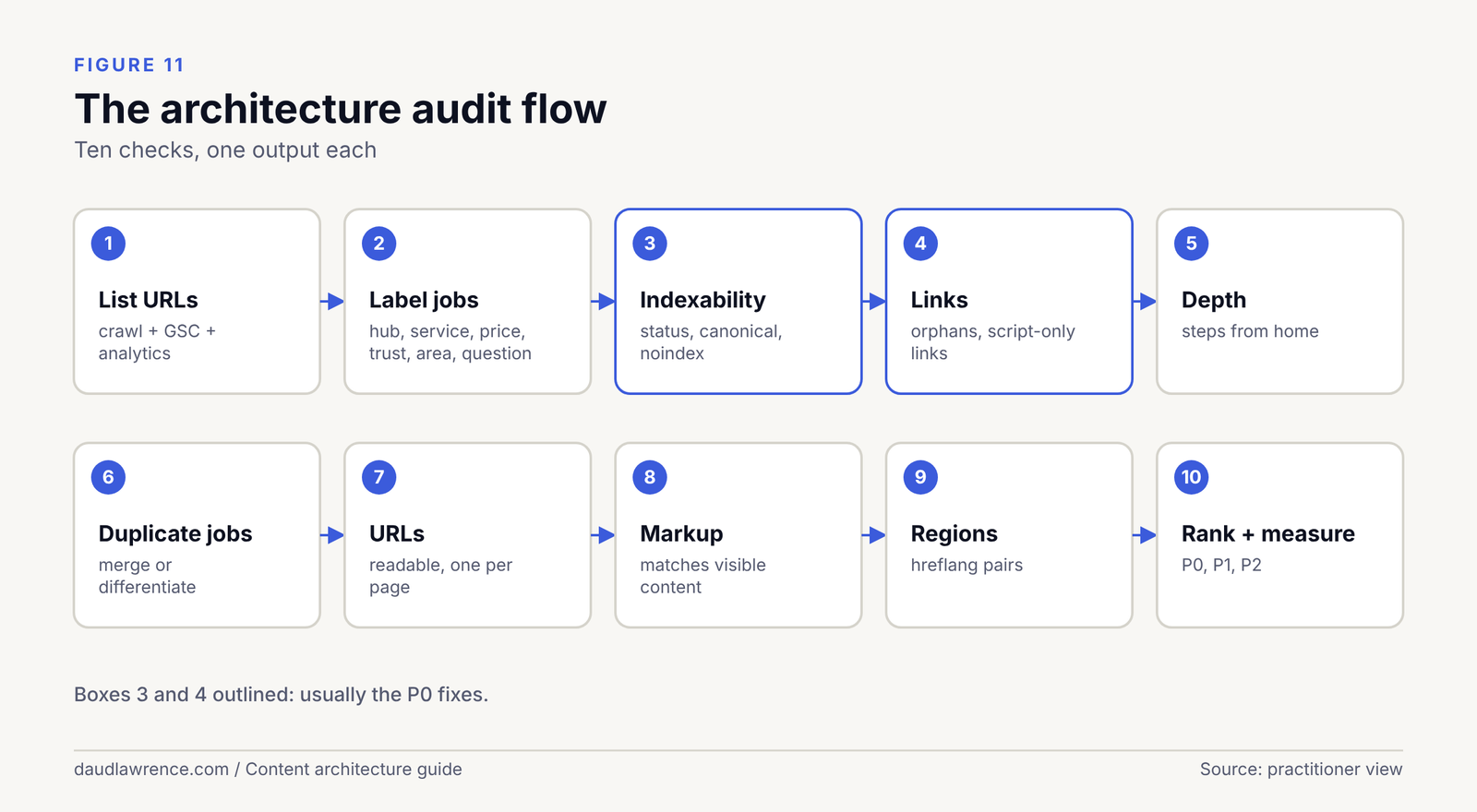
- List the URLs. Crawl the site, then add URLs from the Search Console pages report and analytics. Output: one sheet of every URL.
- Label the job of each page. Hub, service, price, trust, sector, area, question, other. Output: one job per page. Pages with no job are candidates for removal; jobs with no page are gaps.
- Check indexability. Status code, canonical, noindex and robots.txt for each page [27][31]. Output: the list of pages that are blocked or canonicalised by mistake.
- Check links. Find orphan pages (no internal link), pages reachable only through scripts, and links that are not
<a href>[15][30]. Output: a fix list. - Check click depth. Count steps from the home page. There is no Google number, so use your own rule and apply it consistently [15][14].
- Check duplicate jobs. Find two or more pages answering the same question (see cannibalisation). Output: merge, differentiate or leave.
- Check URLs. Readable words, one URL per page, no parameters where a clean address will do [26].
- Check markup. Types match the page,
@idvalues are consistent, nothing marked up that is not visible [23]. - Check regions. Hreflang pairs return to each other and use canonical URLs [40].
- Rank the fixes P0, P1, P2. P0: pages blocked from indexing, broken or script-only links to money pages, redirect errors. P1: duplicate jobs, orphans, missing hub links. P2: URL tidy-ups, markup extras.
- Measure. In Search Console, compare impressions and clicks by page group and by country before and after, with the hypothesis written first [38].
Myths and mistakes
- “Every site needs silos.” Not so. A silo is a strict structure where pages link mostly within a group. It suits some sites and hurts others (see the section on when not to use silos). I found no Google statement requiring it.
- “Keywords in URLs rank pages.” Google says keywords in the domain or path “have hardly any effect beyond appearing in breadcrumbs” [14].
- “Three clicks is a rule.” I found no Google document with a click-depth number [15][14][24].
- “Nofollow sculpts link value.” Google says nofollow links “will generally not be followed” [33], and for your own pages it points to robots.txt instead [33]. I make no claim about link sculpting beyond that.
- “More pages mean more authority.” Topical authority is a practitioner term that Google does not document. More pages that repeat each other make cannibalisation more likely.
- “Schema boosts rankings.” Google does not say this [23].
- “Redirect everything to the home page.” My inference is that this is poor for visitors (see restructuring).
- “One location page per suburb.” Only if each page has distinct, useful content. Otherwise see Google’s doorway policy [2].
Checklist
Before building – One central entity for the site and one for each page – A topical map with one job per page – A publishing order
Structure and URLs – Hubs that exist as real pages – One URL per page, readable, consistent – Every page reachable from a crawlable link
Linking – Contextual links with varied, descriptive anchor text – No orphan pages – Breadcrumbs that follow a real user path
Technical – Canonicals, redirects and sitemap agree – No important links that exist only in scripts – Hreflang pairs, if more than one region
Markup and entities – JSON-LD that matches visible content – @id used to connect nodes – Illustrative values replaced with real ones, and no invented sameAs – Name, address and logo consistent everywhere
After launch – A measurement plan by page group and country
Frequently asked questions
These questions come from the “People Also Ask” boxes I recorded on 20 October 2026 in the US and UK [3]. I answer the ones that fit this guide and leave out those that are about other topics.
What is content architecture?
It is the plan for how a site’s pages are grouped, named, addressed and linked, so that each page has one job and people and crawlers can find it. In this guide it also includes the entities each page is about and the markup that states them.
What is site architecture in SEO?
It is the same idea seen from the technical side: the structure of URLs, folders, menus and links. Google’s starter guide says its crawler finds most new pages through links, and also that you should not reorganise a site without a reason [14].
What is site structure in SEO?
A common name for the same thing. A simple site structure is a home page, a small number of hubs, and pages under each hub. The architecture models section compares the options.
What are internal links in SEO?
They are links from one page of your site to another. Google says every page you care about should have a link from at least one other page [15].
How do I make internal links in HTML?
Use an <a> element with an href, for example <a href="/office-cleaning/prices/">office cleaning prices</a>. Google says it can generally crawl a link only if it is an <a> element [15][30].
What type of links are best for SEO?
Google gives no ranking list of link types. It asks for crawlable links with descriptive anchor text [15]. The internal linking sections describe the patterns I use, as a Practitioner view.
Are external links good for SEO?
I found no Google statement that linking out helps rankings. Google’s guidance is about qualifying links you do not vouch for, using attributes such as nofollow[33].
How do I use schema in SEO?
Pick the type that matches the page, write it as JSON-LD, make it match visible content, and test it [23][48][49]. Google does not guarantee that markup will show a feature [23].
Can you give me an example of schema markup?
Yes. The structured data section has three complete examples, for a service-area business, a business with an address, and a personal site.
How many types of schema markup are there?
schema.org has many more types than Google uses. Google’s search gallery lists 25 features that use structured data, as of the page I read on 16 October 2026 [43].
How do I check if my website has schema markup?
Test a page in the Rich Results Test or the Schema Markup Validator [48][49], or view the page source and look for application/ld+json.
Summary
- Give every page one job, and every job one page.
- Choose the central entity of the site and of each page before writing.
- Pick the simplest architecture that works for the size of the site.
- Make URLs readable and stable, and treat every change as work.
- Use crawlable
<a href>links, with a hub linking down and children linking up. - Keep area pages useful or do not publish them.
- State entities in JSON-LD, connected by
@id, and only what is visible. - Keep names, addresses and logos consistent off the site.
- Measure by page group and country, with a hypothesis first.
Glossary
Anchor text: the clickable words of a link.
Canonical URL: the address you prefer when several pages have similar content [27].
Cannibalisation: two pages of one site competing for the same query (a practitioner term).
Click depth: the number of clicks from the home page to a page.
Crawl budget: how many URLs Google will crawl on a site [24].
Doorway page: a page made to rank for a place or phrase that leads to the same destination [2].
Entity: a thing that can be identified, such as a business or a person.
Entity home: the page you treat as the main statement of an entity (a practitioner term).
Faceted navigation: filters that create many URLs from one list [31].
Hreflang: markup that links versions of a page for different languages or regions [40].
Hub: a page that introduces a topic and links to its detailed pages.
JSON-LD: a format for structured data written as a script block [42].
Orphan page: a page with no internal link to it.
Redirect: an instruction that sends a visitor from one address to another [29].
Silo: a structure where pages link mainly within their own group.
Structured data: code that describes a page’s content in a fixed vocabulary [41].
References
Access date for all web pages: 20 October 2026, unless a source note says otherwise.
- Lawrence, D. Own study of page structure on top-ranking commercial cleaning sites in London and Chicago, 20 October 2026, about 17:20 to 17:40 UTC. Search results collected with OpenRush (inspect_serp) from London and Chicago; pages read once each as text conversions. Method and limits are in the study section. No outbound link. ↩
- Google Search Central. Spam policies for Google web search (last updated 28 August 2026). https://developers.google.com/search/docs/essentials/spam-policies↩
- Lawrence, D. Own observations of live Google results, People Also Ask boxes and AI Overviews, collected with OpenRush (inspect_serp), 20 October 2026. Locations: United States (country), and United Kingdom (country). Single snapshot; no outbound link. The UK AI Overview for the site architecture query did not load its body.↩
- Search Engine Land. Website structure guide (27 November 2025). https://searchengineland.com/guide/website-structureReviewed as a text summary; none of its wording is quoted as evidence.↩
- Semrush. Website structure (30 January 2025). https://www.semrush.com/blog/website-structure/Reviewed as a text summary; not quoted.↩
- Ahrefs. Website structure (modified 12 August 2026). https://ahrefs.com/blog/website-structure/Reviewed as a text summary; not quoted.↩
- SEO.com. Website architecture (15 September 2026). https://www.seo.com/basics/technical/website-architecture/Reviewed as a text summary; not quoted.↩
- Search Engine Journal. How to optimize website architecture for SEO (6 February 2023). https://www.searchenginejournal.com/how-to-optimize-website-architecture-for-seo/477179/Reviewed as a text summary; not quoted.↩
- Yoast. Internal linking for SEO (12 November 2025; modified 23 April 2026). https://yoast.com/internal-linking-for-seo-why-and-how/Reviewed as a text summary; not quoted.↩
- Search Engine Land. Internal linking guide (27 November 2025). https://searchengineland.com/guide/internal-linkingReviewed as a text summary; not quoted.↩
- Schema App. What is entity SEO (20 June 2025). https://www.schemaapp.com/schema-markup/what-is-entity-seo/Reviewed as a text summary; not quoted.↩
- Ahrefs. Schema markup (11 May 2026). https://ahrefs.com/blog/schema-markup/Reviewed as a text summary; not quoted.↩
- Search Engine Land. What is schema markup (19 January 2026). https://searchengineland.com/guide/what-is-schema-markupReviewed as a text summary; not quoted.↩
- Google Search Central. SEO starter guide (last updated 10 December 2025). https://developers.google.com/search/docs/fundamentals/seo-starter-guide↩
- Google Search Central. Link best practices for Google (last updated 10 December 2025). https://developers.google.com/search/docs/crawling-indexing/links-crawlable↩
- Google Search Central. AI features and your website. https://developers.google.com/search/docs/appearance/ai-features↩
- Schema.org. Getting started with schema.org. https://schema.org/docs/gs.html↩
- Google Search Central. Local business structured data (last updated 8 September 2026). https://developers.google.com/search/docs/appearance/structured-data/local-business↩
- Google Search Help. Knowledge panels. https://support.google.com/knowledgepanel/answer/7534842↩
- Google Search Central. Organization structured data (last updated 8 September 2026). https://developers.google.com/search/docs/appearance/structured-data/organization↩
- Google Business Profile Help. Guidelines for representing your business on Google. https://support.google.com/business/answer/3038177↩
- Google Search Central. Site names (last updated 10 December 2025). https://developers.google.com/search/docs/appearance/site-names↩
- Google Search Central. General structured data guidelines (last updated 10 July 2026). https://developers.google.com/search/docs/appearance/structured-data/sd-policies↩
- Google Search Central. Managing crawl budget for large sites (last updated 22 July 2026). https://developers.google.com/search/docs/crawling-indexing/large-site-managing-crawl-budget↩
- Google Search Central. Sitemaps overview (last updated 10 December 2025). https://developers.google.com/search/docs/crawling-indexing/sitemaps/overview↩
- Google Search Central. URL structure best practices (last updated 10 December 2025). https://developers.google.com/search/docs/crawling-indexing/url-structure↩
- Google Search Central. What is URL canonicalization (last updated 10 July 2026). https://developers.google.com/search/docs/crawling-indexing/consolidate-duplicate-urls↩
- Google Search Central. Site move with URL changes (last updated 20 August 2026). https://developers.google.com/search/docs/crawling-indexing/site-move-with-url-changes↩
- Google Search Central. Redirects and Google Search (last updated 14 April 2026). https://developers.google.com/search/docs/crawling-indexing/301-redirects↩
- Google Search Central. JavaScript SEO basics (last updated 4 March 2026). https://developers.google.com/search/docs/crawling-indexing/javascript/javascript-seo-basics↩
- Google Search Central. Managing crawling of faceted navigation URLs (last updated 18 December 2025). https://developers.google.com/search/docs/crawling-indexing/crawling-managing-faceted-navigation↩
- Google Search Central. Pagination and incremental page loading (last updated 10 December 2025). https://developers.google.com/search/docs/specialty/ecommerce/pagination-and-incremental-page-loading↩
- Google Search Central. Qualify your outbound links to Google (last updated 10 December 2025). https://developers.google.com/search/docs/crawling-indexing/qualify-outbound-links↩
- Google Search Central. Breadcrumb structured data (last updated 8 September 2026). https://developers.google.com/search/docs/appearance/structured-data/breadcrumb↩
- US6285999B1. Method for node ranking in a linked database. Filed 9 January 1998; granted 4 September 2001. https://patents.google.com/patent/US6285999B1/enPartly read: the first 100,000 of 143,109 characters.↩
- US7716225B1. Ranking documents based on user behavior and/or feature data. Filed 17 June 2004; granted 11 May 2010. https://patents.google.com/patent/US7716225B1/enPartly read: the first 100,000 of 125,054 characters.↩
- Google Search Central. How Search works. https://developers.google.com/search/docs/fundamentals/how-search-works↩
- Search Console Help. Performance report (Search results): overview and basic setup. https://support.google.com/webmasters/answer/7576553↩
- Google Search Central. Managing multi-regional and multilingual sites (last updated 10 December 2025). https://developers.google.com/search/docs/specialty/international/managing-multi-regional-sites↩
- Google Search Central. Localized versions of your pages (last updated 21 September 2026). https://developers.google.com/search/docs/specialty/international/localized-versions↩
- Google Search Central. Introduction to structured data markup (last updated 10 December 2025). https://developers.google.com/search/docs/appearance/structured-data/intro-structured-data↩
- W3C. JSON-LD 1.1: a JSON-based serialization for Linked Data (W3C Recommendation, 16 July 2020). https://www.w3.org/TR/json-ld11/↩
- Google Search Central. Search gallery of structured data features (last updated 16 October 2026). https://developers.google.com/search/docs/appearance/structured-data/search-gallery↩
- Google Search Central Blog (August 2023). Changes to HowTo and FAQ rich results. https://developers.google.com/search/blog/2023/08/howto-faq-changesOnly the title could be verified; the body did not load, so nothing in this guide depends on what it says.↩
- Google Search Central. Profile page structured data (last updated 8 September 2026). https://developers.google.com/search/docs/appearance/structured-data/profile-page↩
- Google Search Central. Article structured data (last updated 8 September 2026). https://developers.google.com/search/docs/appearance/structured-data/article↩
- Google Search Central. Logo structured data (last updated 8 September 2026). https://developers.google.com/search/docs/appearance/structured-data/logo↩
- Google. Rich Results Test. https://search.google.com/test/rich-resultsWeb tool; not run for this guide.↩
- Schema.org. Schema Markup Validator. https://validator.schema.org/Web tool; not run for this guide.↩